Stop Getting Burned By QR Codes: How To Make Short Links People Actually Trust And Click
You did the hard part. You built the campaign, wrote the copy, printed the flyer, bought the ad. Then someone sees your QR code or a random-looking short link and thinks, “Nope, that looks shady.” It is a frustrating problem because your results can quietly drop without any obvious warning. People are more cautious now, and honestly, they should be. Phishing scams trained everyone to be suspicious of strange links, generic QR codes, and anything that hides the destination. The good news is this is fixable. If you want to know how to make trusted QR codes and branded short links, the answer is not to give up on tracking. It is to make the destination feel clear, consistent, and safe. A cleaner link, a branded domain, and a little context around the scan can raise clicks and scans without spending another cent to bring more people in.
⚡ In a Hurry? Key Takeaways
- Use a branded short domain and readable slug so people can tell where the link is going.
- Add context near every QR code, including the brand name and what happens after the scan.
- Trust boosts clicks, helps avoid spam flags, and still lets you keep campaign analytics.
Why people stopped trusting QR codes and short links
For years, marketers loved short links because they were tidy and easy to track. QR codes made print and real-world campaigns measurable. On paper, it was perfect.
Then scammers ruined the party.
People learned that a QR code can hide a bad destination. They learned that a generic short link can mask almost anything. Security tools also got stricter. That means your totally legitimate campaign can trigger the same gut reaction as a phishing text.
This is the real issue. You are not just fighting for attention anymore. You are fighting for trust in a format people have been taught to question.
How to make trusted QR codes and branded short links
If you want more scans and clicks, start by making the link feel human and recognizable. Trust is often built before someone taps anything.
Use a branded domain, not a generic shortener
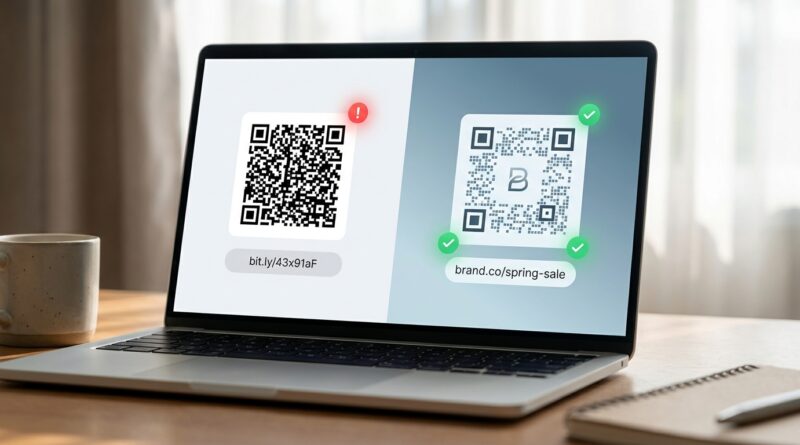
A link like bit.ly/7xQp2L tells people almost nothing. A link like go.yourbrand.com/summer-sale tells them quite a lot.
That one change matters. A branded short domain signals ownership. It tells the user this link belongs to your company, not some random third party. It also looks more professional on print materials, social posts, packaging, and presentations.
Good examples:
shop.acmeco.com/fall
go.acmeco.com/demo
visit.acmeco.com/menu
Bad examples:
bit.ly/4Kj29z
tinyurl.com/q8m1xp
short.ly/a7dQ9
Make the slug readable
The part after the slash should be easy to read and easy to guess. This is one of the simplest ways to make a short link feel safer.
Use words people recognize. Keep it short. Match the campaign.
Good slugs include:
/pricing
/book-demo
/menu
/event
Avoid auto-generated gibberish unless there is a strong reason you cannot. Random strings save a few seconds on setup and cost you confidence later.
Tell people what will happen after the scan
This is the step many campaigns skip. Do not just place a QR code on a poster and hope for the best. Add a plain-English label right next to it.
Examples:
Scan to view the menu
Scan to book your appointment
Scan to download the event schedule
That little line lowers anxiety. It answers the question everyone has before tapping. “What happens next?”
Keep your branding consistent
Your QR code, landing page, and short link should all feel like the same company made them. Same logo. Same brand colors. Same tone. Same offer.
If the flyer says one thing and the landing page looks unrelated, people will bounce. Fast.
Consistency matters because users do quick trust checks. They do not always say it out loud, but they notice when things feel off.
What makes a QR code look sketchy
Sometimes the problem is not the link itself. It is the presentation.
No brand name nearby
A naked QR code with no logo, no URL, and no explanation is basically asking for suspicion.
Overdesigned QR codes
Yes, you can stylize QR codes. No, you should not turn them into modern art. If the code is too fancy, hard to scan, or missing quiet space around the edges, people and phones both get annoyed.
Mismatched destination
If the printed piece says “Claim your 20% discount” and the scan opens a homepage with no discount in sight, trust drops instantly.
Long redirect chains
Some tracking setups bounce users through multiple URLs before they land. That can trigger warnings, slow page loads, and make security systems nervous.
How to keep analytics without looking like a scam
This is where many teams go too far. They want every click tagged, every source tracked, every user segmented. Fair enough. But if the setup looks shady, fewer people click in the first place.
The trick is balance.
Use first-party tracking where possible
If your branded domain handles the redirect, that usually feels safer than sending users through a chain of outside services. It also gives you more control over link health and reporting.
Keep redirects clean
One redirect is fine. A maze is not. The shorter and cleaner the trip, the better the experience and the lower the chance of security warnings.
Use UTMs carefully
You still need campaign data. That is normal. Just keep it tidy behind the scenes when possible, instead of exposing users to giant messy URLs. A branded short link can point to a properly tagged landing page without making the public-facing URL look ugly.
Check how your links appear in previews and filters
Test links in email clients, chat apps, and mobile browsers. Some platforms are quick to flag suspicious redirect patterns. If your link keeps getting stripped, blocked, or hidden, that is a warning sign.
Best practices for QR codes in the real world
QR codes live in messy places. On windows. On tables. On buses. On trade show banners. Real-world conditions matter more than many marketers think.
Give the code enough space
Do not shrink it down until it is an afterthought. People scan from different angles and distances. Make it comfortably scannable.
Add a fallback URL
Print the branded short link under the QR code. This helps users who do not want to scan, and it adds another layer of trust because the destination is visible.
Send people to a mobile-friendly page
This sounds obvious, but it still gets missed. A QR scan almost always starts on a phone. If the page is slow, broken, or hard to read, the trust you earned disappears in seconds.
Test in real lighting
Glossy surfaces, dark backgrounds, and awkward placements can kill scan rates. Print a sample. Put it where it will actually live. Try it on a few phones.
Simple trust checklist before you publish
Before any campaign goes live, ask these questions:
Does the link use our brand name?
Can a normal person read and understand the slug?
Does the QR code say what happens after the scan?
Is the landing page clearly connected to the ad or flyer?
Is there a visible fallback URL?
Does the scan work quickly on mobile?
Have we tested for spam filters or security warnings?
If you cannot answer yes to most of these, fix that before buying more traffic.
Trust is now part of performance marketing
This is the mindset shift. Trust is not just a branding issue anymore. It is a conversion issue.
A lot of teams keep trying to squeeze better results from copy, design, or budget while ignoring the simple fact that the link itself looks suspicious. That is like polishing the front window while the door is locked.
When people feel safe, they click. When they know what comes next, they scan. When the path looks clean and branded, security tools are less likely to interfere.
At a Glance: Comparison
| Feature/Aspect | Details | Verdict |
|---|---|---|
| Generic short link | Uses a public shortener and often shows a random string with no brand context. | Easy to create, but weaker on trust. |
| Branded short link | Uses your own short domain and a readable slug tied to the campaign. | Best mix of trust, clarity, and tracking. |
| QR code with context | Includes brand name, action text, fallback URL, and a mobile-friendly destination. | Most likely to earn real-world scans. |
Conclusion
Right now there is a real tug-of-war between marketers who want deep tracking and audiences who are tired of ugly, sketchy-looking links and QR codes. The winning move is not to strip out analytics. It is to present your links in a way that feels safe and honest. If you focus on branded domains, readable URLs, clear scan instructions, and clean landing pages, you can lift clicks and real-world scans without spending more on traffic. That is a competitive advantage. It helps your campaigns respect user trust, avoid more spam filtering and security blocks, and still keep the data that makes performance marketing useful. In short, better trust usually means better results.