Stop Guessing Your Influencer ROI: How To Use Smart Links To Track ‘Viewers Who Never Click’
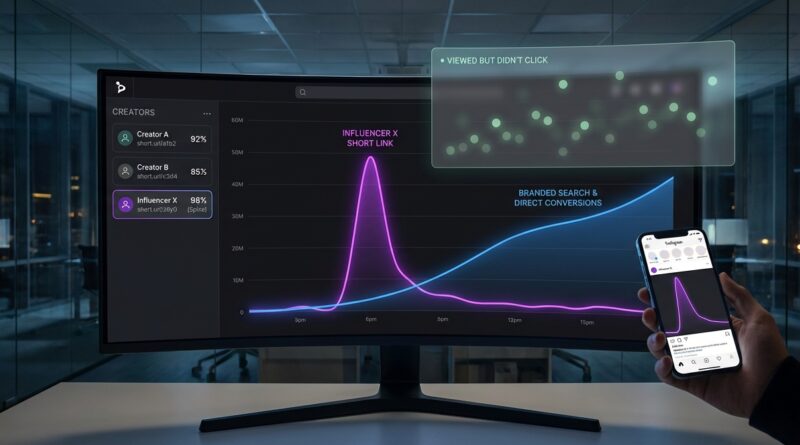
You know the feeling. A creator posts about your product, traffic looks a little better, branded search goes up, and sales trickle in. But your report says that influencer drove almost nothing because hardly anyone clicked the link. That is maddening, especially when you are the one trying to defend the budget. The truth is simple. A lot of people do not buy the way attribution tools wish they would. They watch a Reel, close TikTok or Instagram, and later search your brand on Google, Amazon, or even in Maps. Standard short links miss that whole path. So the sale gets credited to “direct,” “organic,” or whatever channel happened to catch the final click. If you want to track influencer roi without link clicks, you need smart links paired with post-view signals, branded search lift, and a clean naming system that connects creator exposure to later action. It is not magic. It is just better tracking.
⚡ In a Hurry? Key Takeaways
- To track influencer ROI without link clicks, use smart links that capture first touch, creator ID, and post-view behavior, then match that data to later branded search and sales.
- Give each creator a unique smart link, landing page tag, discount code, and measurement window so you can spot “saw it, searched later, bought later” patterns.
- Do not rely on screenshots or last-click reports alone. They often undercount creators who spark demand but do not get the final tap.
Why normal influencer tracking keeps letting you down
Most brands still measure influencer campaigns like it is 2019. They hand out a Bitly link, maybe a discount code, then wait for the dashboard to declare a winner.
That sounds neat. It is also incomplete.
People do not behave in a tidy straight line. They see a creator mention your product while standing in line for coffee. They think, “I should check that out later.” Then later means tonight, on a laptop, after typing your brand name into Google.
Your analytics platform sees the final click from search or direct traffic. It does not see the creator who planted the idea unless you set up tracking for that.
What a smart link actually does
A smart link is more than a shortened URL. It is a tracked link that can:
- Identify the creator or campaign source
- Store click data in a first-party friendly way
- Pass visitors to the right landing page for device, country, or platform
- Fire pixels or events for view-through and assisted conversion analysis
- Connect later sessions back to the original exposure window
Think of it like a labeled breadcrumb, not just a redirect.
When someone does click, the smart link drops useful information into your analytics stack. When they do not click, the campaign still creates signals you can measure in other ways, especially if each creator has a unique setup.
The real problem: viewers who never click
This is the part most reports ignore.
Some influencer campaigns are built for direct response. “Tap now, buy now.” In those cases, clicks matter a lot. But many campaigns are really demand creation. A creator builds trust, shows the product in use, and makes your brand feel familiar.
That often leads to delayed action:
- Branded Google searches
- Amazon searches
- Direct visits later in the day or week
- Coupon code use without a link click
- More conversions in exposed regions or audience segments
If you only count direct link clicks, you will underpay the creators who are actually doing the heavy lifting.
How to track influencer roi without link clicks
1. Give every creator a unique smart link
Do not reuse the same campaign URL across five creators and hope you can sort it out later. Create one smart link per creator, and if possible, one per content format too.
For example:
- Creator A, Instagram Story
- Creator A, Reel
- Creator B, TikTok
- Creator B, YouTube description
Name them clearly. Use a format like creator_platform_format_month_year. Boring names are good here. Boring means readable later.
2. Add first-party tracking on the landing page
When someone does click, your site should store source details in a first-party cookie or your analytics tool’s equivalent. That should include:
- Creator name or ID
- Campaign name
- Date of first visit
- Platform
- Content type
Now if they leave and come back three days later through branded search, you can still see that the first touch came from the creator link.
3. Pair the link with a creator-specific code
Codes are not perfect. People share them. Affiliates steal them. Customers mistype them. Still, they are useful as a second signal.
Best practice is simple. Give each creator:
- One smart link
- One discount or vanity code
- One agreed attribution window, such as 7 or 14 days
If the code drives conversions that did not come through the link, that is a clue that the creator influenced the sale even without a tap.
4. Watch branded search lift after each post
This is where a lot of hidden ROI shows up.
After a creator posts, check whether branded search volume rises during the next 24 to 72 hours. You can do this with your paid search platform, Google Search Console trends, your site search logs, and even Amazon brand analytics if you sell there.
You are looking for patterns, not perfection:
- Did searches for your brand spike after Creator A posted?
- Did product-specific searches rise too?
- Did those searches convert at a higher rate than normal?
If yes, that creator likely drove interest even if the link report looks weak.
5. Use holdout periods or geo splits when possible
If you have enough scale, test one group against another. This is one of the cleanest ways to prove creator impact.
Examples:
- Run creators in one region, pause in another similar region
- Stagger creator posting dates instead of launching everyone on one day
- Compare exposed audience segments against unexposed ones
This is less glamorous than reposting screenshots. It is much more useful.
6. Build an “assisted revenue” view in your reporting
Do not ask one number to do three jobs.
You need separate columns for:
- Direct click conversions
- Code-based conversions
- Assisted conversions within the attribution window
- Branded search lift after exposure
- Total estimated revenue influenced
Once you do this, weak creators become easier to spot. So do undercounted stars.
A simple workflow any brand can start this week
You do not need an enterprise data team to get better answers. Start with this:
- Create one smart link and one code per creator.
- Use UTM parameters plus a creator ID field your analytics tool can store.
- Set a standard attribution window, such as 7 days for impulse buys or 30 days for higher-ticket products.
- Track direct clicks, code use, branded search lift, and returning users.
- Review creator performance 48 hours, 7 days, and 30 days after posting.
- Move budget based on the full picture, not only last click.
If that sounds manageable, good. It should.
What smart links should collect
When choosing a smart-link tool or building your own setup, make sure it can capture the basics without making your team miserable.
- Unique creator IDs
- Platform and placement
- Timestamp of click or first visit
- Device and geography
- Landing page version
- Connection to your analytics and ecommerce platform
- Ability to support first-party measurement
If a tool only shortens links and counts taps, it is not enough for serious ROI tracking in 2026.
Common mistakes that make creator performance look worse than it is
Using one homepage link for everyone
This wipes out creator-level insight. It is the tracking version of throwing receipts into a shoebox.
Relying only on last-click attribution
Last click is easy to read and often wrong for creator marketing.
Ignoring delayed conversions
Some products need a few days. Skin care, software, mattresses, supplements, and higher-priced gadgets rarely convert instantly.
Trusting creator screenshots as proof
Views matter, but screenshots are not measurement. They are supporting evidence at best.
Not syncing paid search with influencer activity
If creators cause branded search demand, your search team needs to know. Otherwise the credit gets misplaced.
How to talk about this with your boss or client
Keep it plain.
Try this: “We are not just paying for clicks. We are paying for demand. Our old reports only measured taps. The new smart-link workflow measures taps, return visits, branded search lift, and code-based conversions so we can see which creators influence revenue even when viewers do not click right away.”
That lands better than a wall of attribution jargon.
When a creator still is not worth it
Better tracking is not about proving every influencer is amazing. Sometimes the answer is still no.
If a creator shows:
- Low click interest
- No code use
- No branded search lift
- No assisted conversions
- No meaningful engagement from the right audience
Then you have your answer. Move on. The point is to stop guessing, not to rescue bad partnerships.
At a Glance: Comparison
| Feature/Aspect | Details | Verdict |
|---|---|---|
| Standard short links | Counts direct clicks well, but misses most view-then-search behavior and delayed conversions. | Fine for basic campaigns, weak for true influencer ROI. |
| Smart links plus first-party tracking | Captures creator source data, return visits, assisted conversions, and cleaner attribution over time. | Best option for brands that want proof instead of guesses. |
| Coupon codes alone | Helpful backup signal, but easy to share, misuse, or separate from the original exposure. | Use as a supplement, not your only source of truth. |
Conclusion
If you have been trying to explain influencer performance with shaky screenshots and last-click reports, you are not crazy. The measurement has been incomplete. A simple smart-link workflow gives you a much fairer view of what creators actually do, especially the ones who spark sales from viewers who never click in the moment. That matters now because influencer budgets in 2026 are under a microscope, and nobody wants to keep negotiating from vibes. When you can connect creator exposure to later searches, return visits, and real revenue, you can cut weak partnerships faster, protect the strong ones, and spend with more confidence. That is better for your team, better for creators who genuinely perform, and better for the whole community trying to make marketing numbers make sense again.