Stop Letting In‑App Browsers Steal Your Conversions: How To Make Short Links ‘App‑Proof’ In 2026
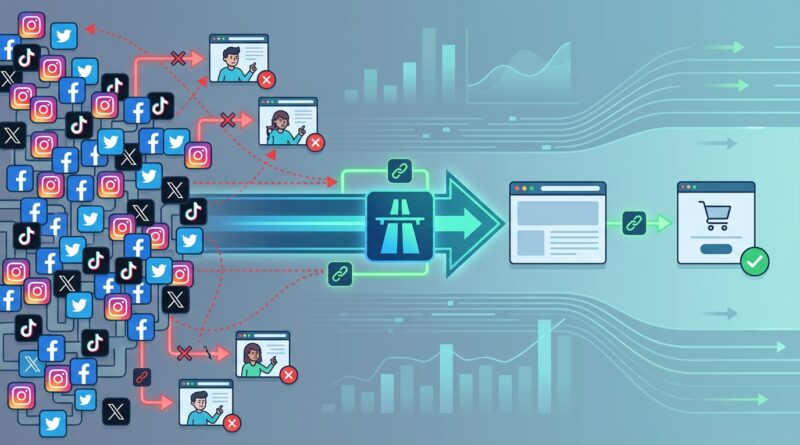
You pay for the click, the report says the visit happened, and still the sale never shows up. That is maddening. A lot of that loss now happens inside in-app browsers on Instagram, TikTok, Facebook, and other apps that open your link in their own mini browser instead of the user’s normal one. Things look almost fine on the surface, but tracking scripts can fail, cookie handoffs can break, login sessions get lost, payment flows feel sketchy, and deep links do not always open the way you expected. The result is simple. You are buying traffic that leaks before it becomes revenue. The fix is not to buy more ads. It is to make your short links app-proof. That means detecting when a click came from an in-app browser, sending the visitor to the safest next step, and separating those visits in analytics so you can see what is really going on. Done right, you can rescue campaigns you already paid for.
⚡ In a Hurry? Key Takeaways
- Use short links that detect in-app browsers and route users to a safer fallback, not always the same landing page.
- Add an “Open in browser” step for Instagram and TikTok when login, checkout, or app deep linking matters.
- Tag in-app traffic separately so your reports show conversion leak clearly instead of hiding it inside normal clicks.
Why in-app browsers hurt conversions
Most people never notice they are inside an in-app browser. They tap a link in Instagram Stories or a TikTok bio, and a page opens. Looks normal enough. But under the hood, it is often a restricted browser environment with different cookie behavior, limited handoff to apps, odd cache rules, and weaker support for some tracking or payment flows.
That creates a quiet mess for marketers. A user may start signup, fail to autofill a password manager, hit a payment page that feels off, or get kicked out of an SSO flow. They leave. Your dashboard still shows a click. Sometimes it even shows a pageview. So the campaign looks healthier than it really is.
This is the core of in app browser url shortener best practices. Your link should not just redirect. It should make a smart choice based on where the click came from.
What “app-proof” short links actually do
An app-proof short link is not magic. It is just a redirect layer with rules.
It detects the click environment
The short link checks signals like the user agent, referrer, device type, operating system, and app markers that suggest the visitor came from Instagram, TikTok, Facebook, or another in-app browser.
It chooses the right next step
If the destination is safe to open inside the app, such as a simple article or lightweight product page, the link can send the user there directly. If the destination depends on login, checkout, identity verification, or deep linking into another app, the short link can route the visitor to an intermediate page with a clear button like “Open in Safari” or “Open in Chrome.”
It keeps analytics honest
The redirect can append clean source labels so your analytics split “Instagram in-app browser” from “Instagram opened in external browser.” That one change often explains why some campaigns get lots of clicks but weak conversion rates.
The flows most likely to break
Not every page needs special treatment. Focus on the money pages first.
1. Login and signup
Password managers may not behave the same way. Single sign-on with Google, Apple, or Microsoft can be shaky in some in-app browsers. Magic-link logins can bounce users into a loop.
2. Checkout and payments
Some payment providers work, some work badly, and some feel suspicious enough that buyers back out. Even a tiny trust hit can lower conversion.
3. App deep links
If you want to open your app from a campaign link, in-app browsers often get in the way. The fallback path matters a lot here.
4. Consent and attribution steps
Cookie consent, attribution windows, and post-click tracking may behave differently. You think your campaign is underperforming. In reality, part of the journey is invisible or broken.
A practical setup for 2026
You do not need a giant rebuild. Start with a few decision rules.
Step 1: Sort your destinations by risk
Put every campaign link into one of three buckets.
- Low risk: blog posts, simple landing pages, product info pages.
- Medium risk: lead forms, webinar signups, booking pages.
- High risk: login, checkout, account creation, app install or app open flows.
Low-risk pages can usually open directly. Medium-risk pages may need testing by app. High-risk pages should usually get special handling when opened inside Instagram or TikTok.
Step 2: Detect the in-app browser
Your short link tool or redirect logic should identify known app browsers. You do not need to be cute about it. Start with the major traffic sources that are costing you money.
Look for patterns from Instagram, TikTok, Facebook, Messenger, and similar environments. Keep the rules updated, because apps change their browser behavior often.
Step 3: Send visitors to the right fallback
This is where most teams lose the plot. The fallback should match the task.
- If the goal is reading content, send users straight to the page.
- If the goal is filling out a form, test whether the form works well inside that app browser. If not, prompt to open externally.
- If the goal is checkout or login, use an intermediate page that explains why opening the default browser is safer and faster.
- If the goal is opening your app, use a store fallback or external browser handoff when deep linking fails.
Step 4: Keep the handoff simple
Do not dump users onto a geeky warning page. Give them one short sentence and one obvious button.
Example: “This checkout works best in your phone’s browser. Tap below to continue securely.”
That is better than a wall of technical text about cookies and embedded webviews.
Step 5: Tag everything cleanly
Add parameters that tell you:
- the original source app
- whether the user was detected in an in-app browser
- whether they were sent direct or to a fallback page
- whether they opened externally
Now your analytics can answer useful questions. Did Instagram clicks convert badly because the ad was weak, or because the browser flow broke? Those are two very different problems.
Best practices for in-app browser URL shorteners
If you are searching for real in app browser url shortener best practices, these are the rules worth following.
Use one stable short link per campaign asset
Do not keep swapping the public link unless you have to. The short link should be the permanent front door. Change the destination logic behind it.
Do not rely on one destination for every platform
The same link can safely route users differently based on app, device, or region. That is not trickery. It is basic hygiene.
Prioritize trust on money pages
If the user is about to pay or log in, reduce friction and uncertainty. An external browser often feels more secure and behaves better.
Keep the redirect fast
Every extra hop costs people. Your short-link logic should be quick. Detect, decide, send.
Do not hide the source in analytics
If all traffic lands under one generic source, you cannot see where the leak happens. Separate app-browser traffic from normal mobile browser traffic.
Test on real devices, not just desktop simulators
What works in a browser preview can fail on an actual iPhone inside Instagram. Always test the real path.
Build fail-safe destinations
If deep linking fails, send users somewhere useful. App store, mobile web, or a lightweight explanation page. Never a dead end.
This is also why teams should think beyond social links. If your short links are printed on packaging or posters, the same principle applies. A smart redirect should survive changing destinations and broken endpoints over time. Our piece on Stop Letting Your QR Codes Die: How To Build ‘Self-Healing’ Short Links Before Link Rot Kills Your Campaigns covers that wider strategy well.
A simple decision tree you can copy
Here is a plain-English version.
- User taps short link.
- Redirect checks source app and device.
- If not in an in-app browser, send directly to the normal destination.
- If in Instagram or TikTok and destination is high risk, show the “Open in browser” page.
- If user continues externally, pass clean campaign tags forward.
- If external open fails, send to a mobile-safe fallback page.
- Log each step so analytics show where users dropped off.
That is enough to improve a surprising number of campaigns.
What to say on the intermediate page
This page matters more than people think. If it sounds scary, users bail. If it is vague, they do not know why they are there.
Use:
- Short headline: “Open in your browser to continue”
- One reason: “This helps checkout and login work properly”
- One main button: “Open Now”
- One backup option: “Continue here instead”
That backup option is important. Some users will not switch. Give them a path, even if it is a lower-converting one.
How to measure whether the fix worked
Do not just watch total conversions. Compare these metrics before and after.
- landing-page completion rate by source app
- signup start to signup complete rate
- checkout start to purchase rate
- bounce rate for in-app browser traffic
- share of users who choose external browser handoff
You may find something surprising. The ad creative was fine all along. The real issue was the environment after the click.
Common mistakes that make things worse
Sending everyone to the same fallback page
A blog reader does not need the same treatment as a buyer entering payment details.
Using aggressive popups or forced app opens
Users hate feeling trapped. Keep control in their hands.
Breaking attribution while fixing the flow
If your external-browser handoff strips campaign tags, you solved one problem and created another.
Ignoring organic social traffic
Paid clicks are not the only ones affected. Creator links, bio links, and organic story links can leak too.
Testing once and forgetting it
Apps update. Browsers change. Re-test your highest-value flows often.
At a Glance: Comparison
| Feature/Aspect | Details | Verdict |
|---|---|---|
| Direct link for all users | Fast and simple, but risky for login, checkout, and deep-link flows inside Instagram and TikTok browsers. | Fine for low-risk content pages only. |
| App-detecting short link | Identifies in-app browser traffic and routes users based on destination risk and device context. | Best overall approach for modern campaigns. |
| Intermediate “Open in browser” page | Adds one extra step, but improves trust, login success, payment reliability, and analytics clarity. | Strong choice for high-value conversion paths. |
Conclusion
Marketers are finally seeing how much conversion leak comes from in-app browsers quietly breaking tracking, logins, and payments, especially on Instagram and TikTok. The good news is that you do not need to throw out your campaigns or double your ad spend. A smarter short-link setup can detect the app environment, trigger the right fallback, and keep your analytics clean enough to show what is really happening. Start with your highest-value flows, test them on real devices, and route users with a little more care. Very often, the conversions are not gone. They are just getting lost on the way.