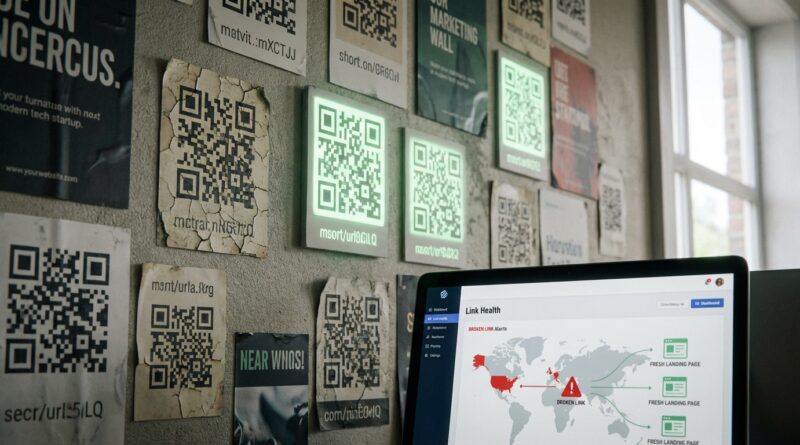
Stop Letting Your QR Codes Die: How To Build ‘Self‑Healing’ Short Links Before Link Rot Kills Your Campaigns
You know the feeling. The campaign looked great on launch day. The QR code was on posters, packaging, menus, mailers, maybe even the side of a van. Then a few months later the landing page moved, the offer expired, the tracking broke, or some well-meaning teammate “cleaned up” a URL. Now the code still scans, but it sends people nowhere useful. That is link rot, and it is one of the quietest ways to waste ad spend. The fix is not complicated, but it does require one mindset shift. Never point a printed QR code or public short URL straight at a fragile final page. Instead, point it at a link you control and can update later. That is the heart of a self-healing short link. It gives you one stable front door, even when everything behind it changes.
⚡ In a Hurry? Key Takeaways
- To prevent link rot for QR codes and short URLs, always use a redirect link you own instead of linking printed codes directly to a landing page.
- Set up monitoring, fallback pages, and simple redirect rules so broken destinations can automatically send visitors somewhere useful.
- This protects revenue, saves printed materials from becoming obsolete, and keeps old campaigns working longer without a full rebuild.
Why QR codes “die” long before the campaign should
QR codes are not really the problem. They are just snapshots. Once printed, they cannot change. If the destination behind them changes, the QR code keeps faithfully sending people to the wrong place.
That happens more often than most teams expect. A page slug changes during a site refresh. A product goes out of stock. A regional campaign ends. A tracking parameter gets stripped out by a tool update. A mobile app deep link stops working after an app change. The QR code still scans. The customer still tries. But the journey falls apart at the last step.
That is why basic URL shorteners are only half a solution. They make ugly links look neat. They do not automatically protect you after launch unless you have a process behind them.
What a “self-healing” short link actually means
Self-healing sounds fancy, but the idea is simple. You create one permanent short URL or QR destination that you control. Behind that stable link, you set rules, checks, and backups.
So if the original landing page disappears, the short link can be updated to a new page. If a product page is gone, traffic can go to a replacement category page. If an offer expires, people can be sent to the current promotion instead of a 404 page.
Think of it like mail forwarding. The address people know stays the same. You decide where it goes now.
The golden rule to prevent link rot for QR codes and short URLs
Never print the final destination
If a QR code points directly to yourstore.com/summer-sale-2024-landing-page-final-v3, you are taking a gamble. That page name alone tells you it will not age well.
Instead, create a controlled short link such as go.yourbrand.com/summer or yourbrand.link/menu. Print the QR code for that controlled link, not the actual landing page.
Then, if the campaign changes, you update the redirect target in one place. The printed code stays useful.
The five building blocks of a self-healing link setup
1. Use a domain you own
If possible, use your own short domain or subdomain. Examples include go.yourbrand.com, links.yourbrand.com, or a short branded domain you control.
This matters for two reasons. First, it builds trust. People are more likely to scan or click a branded link than a random shortener. Second, it gives you control. If a third-party shortener changes pricing, policies, or disappears, your links should not disappear with it.
2. Keep the public slug stable and human-readable
Use simple slugs that match the real-world thing people are scanning. Good examples include /menu, /offer, /register, /warranty, or /support.
Avoid tying the public slug to a date, internal campaign code, or specific landing page version unless there is a very good reason. Your printed link should outlive your internal naming habits.
3. Redirect to a destination that can change
This is the core step. The short URL should be a redirect, not the final page. If the target changes, you edit the redirect rule, not the QR code.
Use a 302 redirect if the destination may change often. Use a 301 only if you are very sure the destination is permanent. For many live campaigns, 302 is the safer starting point because it keeps your options open.
4. Add a fallback destination
If the preferred target fails, do not dump visitors onto a dead page. Send them somewhere useful.
For example, if a product URL breaks, route visitors to:
- The product category page
- A current promotions page
- A location finder
- A support page with a clear next step
Some teams build a universal fallback page for QR traffic. That page can say, “This offer has changed, but here is the latest version,” which is far better than a blank error screen.
5. Monitor the target automatically
This is where the “healing” part becomes real. Set up link checks so your system tests destination URLs on a schedule. If a target starts returning a 404, 500, timeout, or bad redirect chain, you get an alert or trigger a backup rule.
You do not need a giant enterprise setup. Even a lightweight monitor that checks every few hours can catch the obvious failures before customers do.
A practical setup any marketing team can start this month
If you want a simple system to prevent link rot for QR codes and short URLs, start here.
Step 1. Create a link inventory
Make a spreadsheet with every public QR code and short URL you have in the wild. Include:
- The printed location or campaign
- The public short link
- The current destination
- The owner inside your team
- An expiry or review date
- A fallback destination
This alone will reveal how many “mystery links” your business is relying on.
Step 2. Separate permanent links from temporary campaigns
Some links should always exist, like /menu or /support. Others are time-limited, like /spring-offer. Label them differently. Permanent links need long-term ownership. Temporary links need an end-of-campaign plan.
Step 3. Decide what happens when a campaign ends
Do not wait until after the expiry date. Before launch, decide the retirement path.
For example:
- Expired offer goes to the current deals page
- Retired event page goes to the events calendar
- Discontinued product goes to the replacement product or category page
Step 4. Add link health monitoring
Use website monitoring tools, redirect audits, or your own script to test each destination regularly. Check for:
- 404 and 500 errors
- Redirect loops
- Redirect chains that are too long
- Targets that load only on desktop but fail on mobile
- Deep links that break when the app is missing
Step 5. Review your printed campaigns every quarter
This sounds boring. It saves money. Printed links often outlive digital assumptions. Restaurant tables, brochures, packaging inserts, posters in branch offices, event signage, and vehicle wraps can stick around for months or years.
Put recurring reviews on the calendar. A ten-minute check can save a campaign that still gets meaningful traffic.
Where most teams accidentally break things
Site redesigns
A redesign is one of the biggest sources of link rot. Pages move. Slugs change. Whole sections get archived. If your QR code points straight to those pages, you are in trouble.
Before any redesign goes live, export all QR and short-link destinations and test them against the new site structure.
Overcomplicated tracking links
UTM tags and app deep links are useful, but too much complexity makes links fragile. If one tool in the chain changes how it handles parameters, your destination can fail or your analytics can become garbage.
Keep the public link clean. Add only the tracking you truly need, and test it on real phones, not just in a desktop browser.
Letting one person “own” the link system in their head
This is common in small teams. One person knows how the shortener works, where the QR files live, and which redirects matter. Then they leave, go on holiday, or move roles.
Document the setup. Shared ownership beats heroic memory every time.
How to make links heal automatically, not just manually
Manual updates are better than nothing. Automatic recovery is better still.
Use conditional redirect rules
If target A returns an error, send the visitor to target B. This can be done through some link management platforms, reverse proxies, CDN rules, or custom scripts.
Build a “smart fallback” page
A good fallback page can use context from the short link to suggest the next best option. If someone scanned a code from packaging, show current product info. If they scanned a poster for an expired event, show upcoming dates.
Check links from different devices and regions
Some links work fine in the office and fail in the real world. A deep link may open on iPhone but not Android. A page may work in one country but not another. If your campaign is broad, your tests should be too.
Alert before customers notice
Set alerts for status code changes, unusual drop-offs, or sudden spikes in scans with no conversions. Sometimes the problem is not “no traffic.” It is traffic landing on a broken page and leaving instantly.
Analytics can lie when the destination is broken
This is one of the nastiest parts of link rot. Your dashboard may show campaign traffic falling off, when in reality people are still scanning. They are just hitting errors, bad redirects, or stale pages that make them bounce.
If you suddenly see weak conversion from a still-visible QR campaign, do not assume the market lost interest. Check the full scan-to-destination path first.
A dead page can make a good campaign look tired.
What tools can help
You do not need one specific product. You need a few capabilities.
- Branded short links or a custom redirect domain
- Editable redirects after launch
- Link health monitoring
- Fallback destination support
- Basic reporting on scans, clicks, and failures
- Team access and notes so ownership is clear
If your current shortener only creates links and counts clicks, that is fine for one-off social posts. It is not enough for printed QR codes with a long shelf life.
A simple example
Let’s say a coffee chain prints a QR code on 50,000 loyalty cards. The code points to go.brand.com/join. At first, that redirect sends visitors to the current sign-up page.
Three months later, the sign-up flow moves into the mobile app. Six months later, the app deep link breaks on some Android devices after an update. Without a self-healing setup, customers hit an error and give up.
With a self-healing setup, the team changes the redirect target, adds a mobile web fallback, and routes broken app traffic to a plain sign-up page. The cards still work. The campaign survives. No reprint needed.
Best practices worth stealing
- Create links around user intent, not campaign names
- Use one owner and one backup owner for every public link
- Test every QR code on real phones before printing
- Keep fallback pages plain, fast, and easy to understand
- Retire old destinations, not old public links
- Review links after every site migration, app update, and seasonal campaign change
At a Glance: Comparison
| Feature/Aspect | Details | Verdict |
|---|---|---|
| Direct QR to landing page | Simple to launch, but breaks when pages move, offers expire, or tracking changes. | Fast at first, risky later. |
| Branded short link with editable redirect | Public link stays stable while the destination can be updated anytime. | Best baseline for most campaigns. |
| Self-healing setup with monitoring and fallback | Adds alerts, backup routes, and rules to catch broken targets before they hurt conversions. | Best long-term protection for printed QR codes and evergreen short URLs. |
Conclusion
Broken links are not a minor housekeeping issue anymore. As more brands rely on QR codes, deep links, and layered tracking, a simple destination failure can quietly drain traffic, revenue, and trust. The good news is that you do not need a full replatform to fix it. If you start using controlled short links, assign owners, add fallbacks, and monitor destinations, you can prevent link rot for QR codes and short URLs before customers ever see the problem. That means fewer wasted print runs, fewer dead campaigns in your analytics, and more value from the marketing you already paid for. While everyone else is chasing the next shiny dashboard, fixing the dead-link problem is still one of the quickest wins on the board.