Stop Trusting Every Short Link: How To Build A ‘Safe Preview Layer’ Before Anyone Clicks
Short links are convenient. They are also a little nerve-racking. Most people have learned, rightly, that a tiny mystery URL could lead to a normal product page, a tracking detour, or a phishing scam. That means every click feels like a gamble. If you send links for work, marketing, newsletters, texts, or community updates, that suspicion now belongs to you too. People are not being difficult. They are being careful. The fix is not to stop using smart links altogether. It is to add a safe preview layer first. When someone can see where the link goes, who sent it, and what happens next, trust goes up fast. If you want to know how to preview short links safely, the best answer is simple: put a branded, transparent preview page between the short link and the final destination so users can verify the target before they commit.
⚡ In a Hurry? Key Takeaways
- Use a branded preview page so people can inspect the destination before the redirect happens.
- Show the final domain, page title, sender identity, and any tracking note in plain language.
- A transparent preview step improves trust and can still keep your routing, attribution, and campaign tracking intact.
Why short links now make people hesitate
We trained people to be suspicious, and honestly, that was the right move.
For years, security advice has said: do not click strange links, especially shortened ones. At the same time, brands, creators, and marketers kept using short links because they look cleaner, fit better in texts, and make campaign tracking easier.
Those two habits now crash into each other every day.
A reader sees a short link in an email or SMS and has no easy way to know what is behind it. Is it your site. A partner landing page. A retargeting wrapper. A login form. Or something nasty pretending to be all of the above.
That uncertainty kills clicks. It also hurts your credibility.
What a “safe preview layer” actually is
Think of it as a polite stop before the final destination.
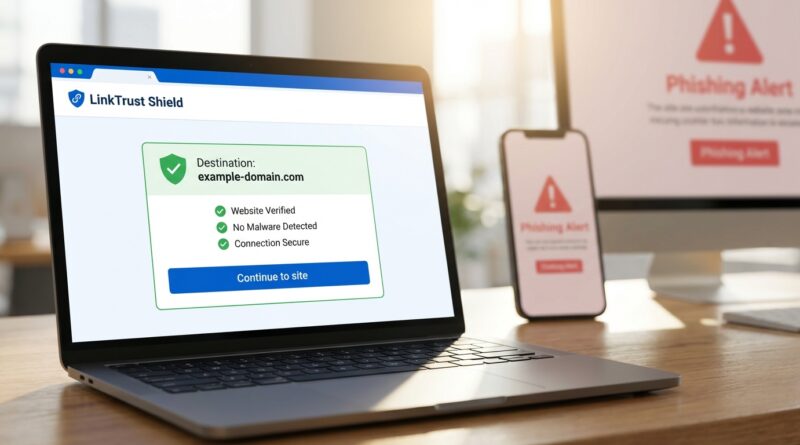
Instead of sending someone straight from a short URL to the target page, you send them to a simple branded preview screen first. That screen shows enough information for a human to make a smart decision.
At minimum, a good preview layer should show:
- The final destination domain
- The page or offer name
- Your brand or sender identity
- A clear button to continue
- A clear button to back out
Even better, include:
- A note if click tracking is in use
- A warning if the destination is a third-party site
- A timestamp or campaign context, such as “April customer update”
- A small preview image or favicon of the destination
This is the practical answer to how to preview short links safely. Do not make people guess. Show them.
Why this works better than telling people to “just trust us”
Trust is not a slogan. It is a design choice.
When a link hides too much, people fill in the blanks with worst-case scenarios. That is normal behavior in 2026, when scam texts, fake delivery links, account alerts, and impersonation emails are everywhere.
A preview layer lowers that fear because it answers the silent questions people always have:
- Where is this taking me?
- Who sent this?
- Is this part of a real campaign?
- Am I about to be tracked in some weird way?
If your preview page answers those questions in plain English, the click feels informed, not forced.
How to build a preview page people will actually trust
1. Use your own branded domain
If possible, the short link and the preview page should live on a domain people can recognize. Not a random shortening service with no obvious connection to your brand.
For example, a custom link domain tied to your business looks far more credible than a generic shortener used by anyone on the internet.
2. Put the final destination in plain sight
Do not bury the target URL in tiny gray text.
Show the main domain clearly. If the final destination is on another company’s site, say so. For example: “You are about to visit payments.examplebank.com” or “This link goes to our event partner at tickets.partnername.com.”
3. Explain any tracking in human language
You do not need a legal essay. A short, honest sentence works better.
Try something like: “This link records anonymous campaign clicks so we can measure newsletter performance.”
That sounds a lot less sneaky than silently bouncing people through three redirects.
4. Keep the page clean
A safe preview page should not look like a pop-up ad from 2009.
Use your logo. Use familiar colors. Keep the copy short. Make the continue button obvious. Give people a visible cancel option too.
5. Add security signals, but do not overdo them
HTTPS matters. So does a sensible layout and proper spelling. You can also include a short line such as “We will never ask for your password on this page.”
What you do not want is a wall of badges and warnings that makes the page look more suspicious than the link itself.
What not to do
Some preview steps make the experience worse, not better.
Avoid these mistakes:
- Auto-redirecting before the person can read anything
- Hiding the final domain
- Using vague copy like “Click here to proceed securely”
- Loading too many trackers before consent or notice
- Showing one domain in the preview but sending users somewhere else
That last one is especially damaging. Once people catch even one mismatch, trust is gone.
Who should use a safe preview layer
Not every link needs this extra step. But many high-friction channels do.
It is especially useful for:
- Email campaigns with shortened URLs
- SMS marketing and account alerts
- Social bios and limited-character posts
- Affiliate or partner routing links
- Community newsletters and donation links
- QR codes printed on posters, flyers, or packaging
QR codes are a great example. People scan first and only then find out where they are going. A preview page gives them a chance to confirm the destination before opening a payment page, app store listing, or sign-in screen.
How marketers keep the benefits without feeling sneaky
This is the part many teams worry about.
If we add a preview page, do we lose attribution, routing, A/B testing, or campaign analytics?
Usually, no.
You can still use smart links for device routing, geographic targeting, campaign tags, and source tracking. The difference is that you reveal the journey instead of hiding it.
That is the sweet spot. You keep the operational benefits. Your audience keeps their dignity and their caution.
A practical setup might look like this:
- User clicks short branded URL
- Preview page displays destination and context
- User confirms
- Smart routing sends them to the correct final page
- Analytics log the confirmed click
That extra confirmation step can reduce anxious drop-off, especially for audiences already tired of scam attempts.
A simple template for a trustworthy preview page
If you need a starting point, keep it this simple:
You are leaving BrandName.com
This link will take you to: offers.brandname.com/spring-upgrade
Purpose: Account upgrade details for current subscribers.
Tracking note: We record click totals for campaign reporting.
If this does not look right, do not continue.
That is enough for most use cases. Clear beats clever.
How to preview short links safely as a user, not just a sender
If you are on the receiving end of short links, you can still protect yourself.
Before clicking, try this:
- Hover on desktop to see whether your browser or app reveals any destination info
- Use built-in link expanders from reputable short-link services when available
- Look for brand mismatch, like a bank message using a random domain
- Be extra cautious with login prompts, delivery alerts, and urgent payment requests
- If the sender is known, ask them to send the full direct URL instead
And if a preview page appears, actually read it. Do not click through on autopilot. The whole point is to give you one last sanity check.
When skipping the preview step is still fine
There are cases where a preview layer may be overkill.
If the destination is already obvious, the audience is expecting the link, and the domain is visible and familiar, a direct link may be better for speed.
For example, links inside your own app, authenticated dashboard links, or obvious navigation links on your own website may not need a preview screen.
But for cold outreach, public campaigns, QR codes, SMS, and social traffic, the preview step earns its keep quickly.
At a Glance: Comparison
| Feature/Aspect | Details | Verdict |
|---|---|---|
| Direct short link | Fastest path, but the destination is hidden until after the click. | Convenient, but trust is weaker. |
| Branded preview layer | Shows the final domain, context, and tracking note before redirecting. | Best balance of safety, trust, and analytics. |
| Generic third-party preview tool | Can reveal the destination, but may not match your brand or workflow. | Useful for one-off checks, less ideal for audience trust. |
Conclusion
People are not wrong to hesitate before clicking a short link anymore. They are responding to the internet we built, where clean-looking URLs can hide a lot. That is exactly why a safe preview layer matters. It gives people a moment to verify the destination, understand the context, and decide with confidence. For anyone asking how to preview short links safely, the answer is not to abandon smart links. It is to make them more transparent. Security guides keep telling people to never trust short links, while marketers are told to use them everywhere, and that tension is making click-through harder in 2026. A clear, branded preview step calms human suspicion, keeps you aligned with modern phishing guidance, and lets you keep all the routing and tracking benefits without feeling sneaky. When you show your community where a link goes and what is being recorded, you stop asking for blind trust and start earning real trust instead.