Stop Wasting Clicks: How To Use Smart Redirect Rules To Send Each Visitor To The Perfect Page
You pay for the click, finally get the visitor, and then send everyone to the same page. That is where a lot of marketing quietly goes wrong. It is frustrating because the traffic is not the same. A first-time visitor from Instagram is not looking for the same thing as a repeat customer from your email list. A mobile user on a shaky connection does not have the same patience as someone browsing on a laptop at work. Yet many short links treat them all like identical people. The result is a generic experience that wastes intent, hurts conversions, and makes your campaigns look weaker than they really are. The fix is simpler than it sounds. Smart redirect rules for short links let you route people based on things like device, location, time, or whether they have visited before. One link can start acting like a helpful traffic cop instead of a one-size-fits-all doorway.
⚡ In a Hurry? Key Takeaways
- Smart redirect rules for short links send different visitors to different pages based on context, which often lifts conversions without changing your ads or emails.
- Start with three simple rules: mobile vs desktop, new vs returning visitors, and location-based offers.
- Keep a default fallback page and test every rule yourself first, so nobody lands on a broken or confusing page.
Why one landing page is often the wrong answer
Marketers love the idea of a single clean URL. It looks tidy in an ad, neat in a bio, and easy in an email. The problem starts after the click.
If that same short link sends every visitor to one generic landing page, you lose useful context. Someone who already bought from you may be ready for an upgrade. Someone in another country may need local pricing. Someone on mobile may need a stripped-down page that loads fast and puts the call to action right at the top.
When all of those people land in the same place, some will still convert. Plenty will not. Not because your offer is bad, but because the path is lazy.
What smart redirect rules for short links actually do
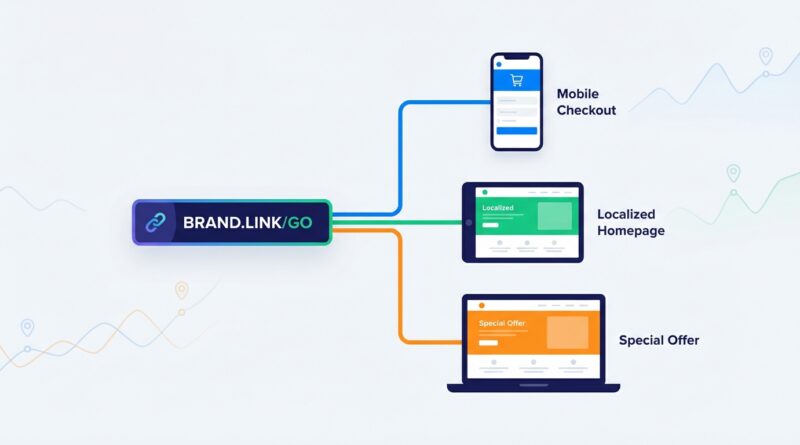
Think of a short link as a front desk, not just a shortcut. When someone clicks it, the link can quickly decide where that person should go next.
That decision can be based on simple conditions, such as:
- Device type, like mobile, tablet, or desktop
- Location, such as country, state, or city
- Time or day of week
- Traffic source, like email, social, or paid ads
- New vs returning visitors
- Language or browser settings
This is the heart of smart redirect rules for short links. You keep one public-facing URL, but behind the scenes it sends each visitor to the page that makes the most sense.
Where this helps the most
1. Cold traffic vs loyal customers
Cold traffic usually needs more trust-building. That might mean a product explainer, testimonials, or a softer offer. Loyal customers often do not need the warm-up. They may respond better to a fast reorder page, a bundle, or an upsell.
If both groups get the same page, one of them is likely getting the wrong experience.
2. Mobile vs desktop
This is a big one. A desktop landing page might look fine on your office monitor and still be annoying on a phone. Maybe the form is too long. Maybe the video is too heavy. Maybe the checkout button is buried.
A smart redirect can send mobile users to a lighter page built for smaller screens. That alone can rescue clicks you already paid for.
3. Regional promotions
If you sell across different places, your visitors may need different currencies, shipping details, or product availability. A visitor in Canada should not have to figure out a US-only promo. A customer in London should not be surprised by pricing in dollars.
Short links with location rules can fix that before confusion starts.
4. Testing offers without changing the link
This is one of the most practical uses. You can keep the same short URL in your ad, newsletter, QR code, or printed flyer, while changing the destination behind it.
That means you can test Offer A against Offer B, rotate seasonal pages, or pause a low-performing page without touching the link people already have.
Three easy redirect rules to set up first
If you are new to this, do not build a giant maze. Start small. Here are the three rules most businesses can put to work in one afternoon.
Rule 1: Send mobile users to a mobile-first page
Create a simpler version of your main landing page. Cut the clutter. Use shorter forms. Make the button obvious.
Then set your short link so mobile visitors go there, while desktop visitors keep going to the regular page.
This is low risk and often gives a quick lift.
Rule 2: Send returning buyers to an upsell or reorder page
If your link platform or connected tools can identify repeat visitors or known customers, do not make them start from scratch. Send them to a page that assumes some familiarity.
Examples:
- A refill page for a consumable product
- A premium plan upgrade
- A members-only discount page
- A bundle built around what they already bought
This works because it respects where the customer is in the journey.
Rule 3: Send by region for local offers
If your promo differs by region, build dedicated landing pages for each version. Then use location-based rules to route visitors correctly.
Keep the changes obvious and useful. Currency, shipping times, store locations, and region-specific discounts are usually enough.
How to set smart redirect rules without making a mess
This is where some people get nervous. They imagine writing code, touching DNS settings, or breaking a live campaign. Usually, you do not need to do any of that.
Most modern link management tools let you create rules in a dashboard. You choose the condition, choose the destination URL, save it, and test it.
A simple setup usually looks like this:
- Create one short link for the campaign.
- Build the destination pages you want to use.
- Add rules in order of importance, such as location first, then device.
- Set a default fallback destination for everyone who does not match a rule.
- Test each scenario before the campaign goes live.
The fallback page matters more than people think. If a visitor does not fit your conditions, they should still land somewhere sensible.
Common mistakes that quietly hurt performance
Too many rules at once
If you stack dozens of conditions, it becomes hard to understand what is helping and what is just noise. Start with a handful you can measure.
Sending people to pages that do not match the ad
If the ad promises a discount, the landing page needs to show that discount. Redirecting people intelligently does not give you permission to be vague.
Forgetting analytics
If you do not tag your destinations and watch performance by segment, you are guessing. You want to know whether mobile visitors actually convert better on the mobile page, not just assume they do.
No fallback page
This is how people end up on broken links, blank screens, or old pages you forgot to update.
What to track after you turn the rules on
The nice part is you can see results quickly. Watch these metrics first:
- Click-to-conversion rate
- Bounce rate by device and location
- Revenue per visitor
- Average order value for returning customers
- Page load speed on mobile
If one redirect rule improves conversions but hurts order value, that is still useful to know. The goal is not just more clicks. It is better outcomes from the same traffic.
Real-world examples that make this click
An ecommerce brand
A skincare brand runs one short link in Instagram Stories. New visitors go to a quiz landing page that helps them choose a product. Returning customers go straight to a refill bundle. Mobile users get a faster checkout flow. Same short link. Better fit for each person.
A software company
A SaaS team uses one link in email signatures and webinar slides. Visitors from Europe go to euro pricing. US visitors go to dollar pricing. Existing customers go to an expansion plan page instead of the standard free-trial page.
A local business with multiple locations
A dental group uses one QR code on print mailers. The short link checks location and sends people to the nearest clinic booking page. Nobody has to hunt through a main website to find the right office.
Keep it simple enough to explain to your team
Here is my rule of thumb. If you cannot explain your redirect setup in under two minutes, it is probably too complicated.
A clean setup might sound like this: mobile visitors go to the fast mobile page, returning customers go to the upgrade page, visitors in Canada go to Canadian pricing, and everyone else goes to the standard landing page.
That is smart. It is also manageable.
At a Glance: Comparison
| Feature/Aspect | Details | Verdict |
|---|---|---|
| Single destination link | Every visitor lands on the same page, regardless of device, location, or intent. | Easy to manage, but often wastes conversions. |
| Smart redirect rules for short links | Routes visitors based on conditions like mobile, region, time, or returning status. | Best choice when you want better fit without changing the public URL. |
| Rule complexity | A few focused rules are easy to test. Too many become hard to track and troubleshoot. | Start simple, measure results, then add only what proves useful. |
Conclusion
You do not need more traffic to get better results. Often, you just need to stop treating every click like it came from the same person. Right now acquisition costs are climbing while attention is getting shorter, so squeezing more revenue out of the traffic you already have matters more than ever. Smart redirect rules for short links let you run targeted promos by region, send repeat buyers straight to upsells, avoid broken experiences on mobile, and test multiple offers behind a single URL, all without touching your ad creatives or email templates. That is a practical win. Start with one short link, three simple rules, and a solid fallback page. You can set it up in an afternoon, and if you watch your analytics closely, you may see the difference tomorrow.