Your Links Are Being ‘Sanitized’ Behind Your Back: How To Keep Tracking Data When Browsers Auto‑Strip Your URLs
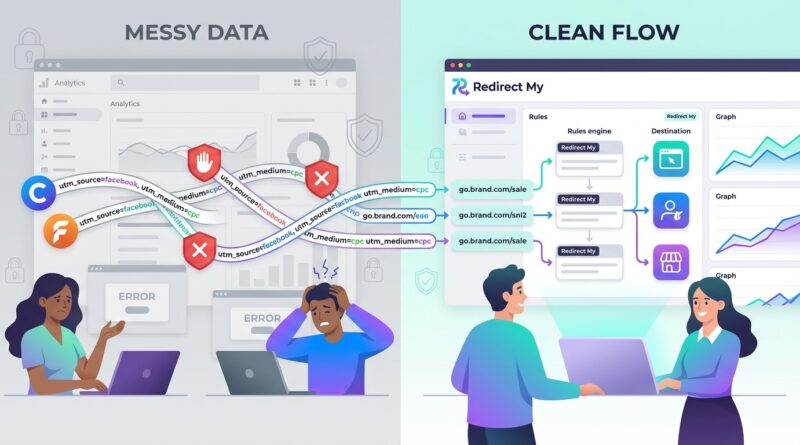
You are not imagining it. You send out a carefully tagged link, your analytics platform still reports traffic, yet the campaign details are suddenly patchy or gone. That is maddening. A browser strips the UTM tags. A privacy extension removes click IDs. A messaging app pastes a “clean” version of your link. The visit still happens, but the useful context disappears on the way. That leaves marketers, publishers, and creators trying to answer basic questions with half the evidence missing. Which ad worked? Which creator sent the sale? Which email actually pulled people in? If you are searching for answers to browsers removing tracking parameters from URLs how to keep analytics, the short version is this: stop putting all your trust in visible URL tags. Keep the link clean for the visitor, but move attribution into your redirect setup so you capture the details before anyone else strips them away.
⚡ In a Hurry? Key Takeaways
- Yes, browsers and privacy tools are removing tracking parameters, so UTMs alone are no longer a reliable source of truth.
- Use a redirect layer that records campaign details first, then sends people to a clean destination URL.
- This approach can preserve useful analytics without stuffing visible links with extra tracking junk.
What is actually happening to your links?
A lot of software now treats tracking parameters like clutter. Sometimes that is good for users. Sometimes it breaks your reporting.
Common URL parameters like utm_source, utm_medium, utm_campaign, and click IDs from ad platforms can be removed before the page even loads. That can happen in the browser, in a privacy extension, in an email app, in a chat app, or when someone copies and shares the link manually.
So the click is real. The context is not.
This is why your dashboards may still show sessions, but channel attribution gets thinner over time. It is not always a broken analytics setup. Sometimes the metadata never arrives.
Why UTMs are becoming less trustworthy on their own
UTM tags still have value. They are simple, widely supported, and easy to test. But they were built for a web that was far less aggressive about stripping tracking data.
Visible tags are easy targets
If the tracking data is sitting in the URL, anything between the click and your landing page can remove it. That includes privacy tools made specifically to do that job.
People share cleaned links
A user may click your fully tagged ad link, then copy the page URL or share a cleaned version from an app. The next visitor arrives with none of the original campaign details attached.
Different tools disagree
One platform may preserve some parameters. Another may remove all of them. That makes reporting inconsistent, which is often worse than having no data at all.
If this sounds familiar, you may also want to read Stop Losing Click Data: How To Shorten URLs Without Breaking Your UTM Tracking, which covers another common reason attribution falls apart.
The smarter fix: capture attribution before the URL gets cleaned
The best workaround is surprisingly simple. Do not depend on the final landing page URL to carry all the intelligence.
Instead, use a redirect link. When someone clicks it, your redirect system logs the campaign details immediately. Then it forwards the visitor to the clean destination page.
That means the visitor sees a tidy link or lands on a tidy URL, while your system has already saved the source, campaign, creator, placement, or whatever else you attached to the redirect.
Why this works better
The key is timing. You capture the data at the redirect step, before the destination URL can be sanitized, rewritten, or shared without parameters.
Think of it like checking a coat at the door. You do not leave your tracking details out in public and hope they survive the trip. You store them safely first.
How to set this up without turning into a data hoarder
You do not need to collect everything. In fact, you should not.
1. Create campaign-aware redirect links
Use a branded short link or redirect URL for each campaign, ad set, partner, or creator. The link itself becomes the carrier of attribution, even if the destination page stays clean.
For example, instead of sending people directly to:
example.com/product?utm_source=newsletter&utm_campaign=spring-sale
You could send them to a redirect like:
go.example.com/spring-email
Your redirect tool maps that short path to the destination and logs the campaign data internally.
2. Keep destination URLs clean
This respects the privacy trend and often looks more professional. It also reduces the chance that shared links get mangled or look suspicious.
3. Store only what you truly need
Campaign name, source, medium, placement, creator ID, and timestamp are usually enough for useful reporting. You do not need to turn every click into a surveillance project.
4. Pass first-party identifiers where appropriate
If your site uses first-party analytics or server-side measurement, connect the redirect event to that system in a privacy-aware way. The idea is to strengthen attribution without exposing extra junk in the URL.
What this looks like in the real world
Say you run the same offer through three channels: Instagram Stories, an email newsletter, and a partner creator.
If you rely only on UTMs in the final URL, one browser strips them, a chat app cleans them, and the creator’s audience shares a parameter-free version around. Your analytics might show a pile of visits with weak attribution, often landing in “direct” or “unassigned.”
With a redirect layer, each channel gets its own link. The redirect records the source before sending the visitor to the same landing page. Now you can still compare channel performance even if the final destination URL stays spotless.
Privacy-friendly does not have to mean analytics-blind
This is the part many teams get wrong. They assume the choice is either:
1. Keep every possible tracking parameter in plain sight.
2. Accept that attribution is doomed.
It is not that binary.
You can respect users by avoiding ugly, overstuffed URLs and still measure campaign performance in a more durable way. The trick is using first-party infrastructure, clear consent practices where required, and collecting only the details needed to understand what is working.
A good rule of thumb
If a person would be surprised or uncomfortable to learn you stored a data point, pause and ask if you really need it. Campaign attribution is useful. Creepiness is optional.
Common mistakes to avoid
Using UTMs as the only attribution method
They are still helpful, but they should not be the only thing standing between you and chaos.
Sending every campaign to the exact same generic short link
If all traffic goes through one redirect, you lose the point of having a redirect layer. Create links with meaningful campaign mapping.
Ignoring app and browser behavior
Test links in Safari, Chrome, Firefox, mobile email apps, messaging apps, and with common privacy extensions. You will often find that behavior varies wildly.
Forgetting to document naming rules
If one person labels a source “instagram” and another uses “IG-stories,” your reporting gets messy fast. Keep naming conventions boring and consistent.
How to test whether stripping is hurting your campaigns
You do not need a big forensic project. Start small.
Run a side-by-side test
Create one standard UTM link and one redirect-based campaign link that leads to the same page. Share them in controlled placements and compare what survives into your analytics and back-end reports.
Look for suspicious “direct” traffic
If campaign spikes are followed by a lot of direct visits to deep landing pages, stripped parameters may be part of the story.
Check creator and partner campaigns closely
These are especially vulnerable because links get reshared, copied, and passed through multiple apps.
At a Glance: Comparison
| Feature/Aspect | Details | Verdict |
|---|---|---|
| Standard UTM links | Easy to create and widely supported, but visible parameters can be stripped by browsers, apps, and privacy tools. | Good as a helper, not strong enough as your only tracking method. |
| Redirect-layer attribution | Captures campaign details before visitors reach the final page, so clean destination URLs can still produce solid reporting. | Best balance of cleaner links and more resilient analytics. |
| Privacy impact | A redirect setup can be privacy-friendly if you keep data minimal, use first-party tools, and avoid collecting more than needed. | Safer than stuffing every destination URL with tracking parameters. |
Conclusion
Link cleaning is not some edge case anymore. It is becoming normal. Browsers are rolling out new ways to block link tracking, privacy tools are stripping UTM and click ID parameters by default, and plenty of apps now encourage or create cleaned URLs when people share links. If you keep treating UTMs as the single source of truth, your reports will keep getting foggier, especially when you need to know which channel, creator, or campaign actually drove results. The better move is to shift the important attribution work into your redirect layer. That keeps the public-facing URL cleaner, gives visitors a more privacy-friendly experience, and helps preserve the analytics you need to make smart decisions. In short, do not fight the cleanup trend head-on. Work around it in a smarter way.