Your Short Links Are Lying To You: How To Finally Match Clicks With Google Analytics (Without Losing Data)
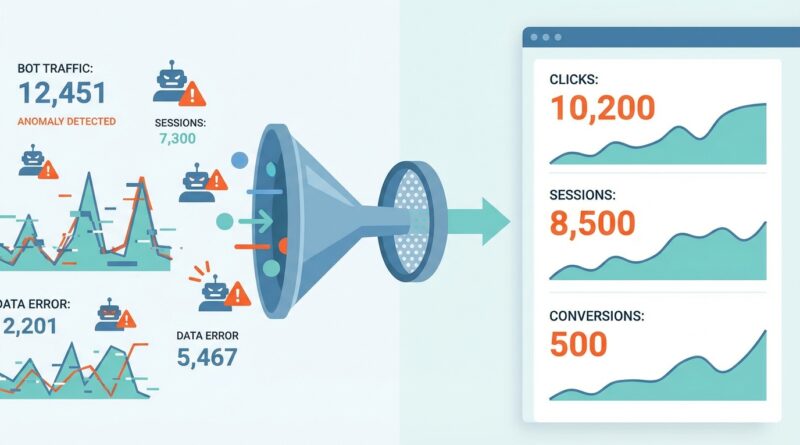
You are not imagining it. Seeing 247 clicks in your link shortener and only 138 sessions in Google Analytics is enough to make any marketer feel like the whole reporting stack is broken. Then a client asks which number is “right,” and suddenly you are defending data you do not even trust yourself. The good news is this mismatch is normal. The bad news is it is usually a mix of bot hits, link previews, redirects, cookie consent, ad platform quirks, and plain old tracking setup issues. Short answer? Your shortener and GA4 are measuring different moments in the journey. One often counts every hit on the short link. GA4 only counts when the destination page actually loads and analytics is allowed to fire. Once you understand that difference, clean up bot traffic, and standardize your UTM setup, the numbers stop feeling random and start telling a consistent story.
⚡ In a Hurry? Key Takeaways
- Shortener clicks and GA4 sessions will almost never match exactly because they track different things.
- Use clean UTM tags, filter bots and previews where possible, and compare against landing page sessions, not total traffic.
- Do not panic and do not promise “perfect parity” to clients. Aim for a clear, explainable gap instead.
Why your link shortener and Google Analytics disagree
This is the part that trips people up. A link shortener usually counts the moment someone, or something, requests the short URL.
Google Analytics 4 counts later. It only records a session if the person reaches the destination page and the GA4 tag actually fires.
That means a lot can happen in between.
What a shortener usually counts
Your shortener may count:
- A real person tapping the link
- A social platform generating a preview
- A messaging app checking the URL for safety
- Email security scanners testing the link
- Bots crawling the redirect
- Multiple rapid requests from the same user
What GA4 usually counts
GA4 usually needs all of these to happen:
- The redirect must complete
- The landing page must load
- The GA4 tag must run
- Consent settings must allow tracking, if you use consent mode or a cookie banner
- The visit must not be blocked by browser privacy tools, ad blockers, or script errors
So if you are searching for why link shortener clicks not matching Google Analytics keeps happening, this is the core reason. They are not competing counters. They are measuring different stages of the same trip.
The most common reasons shortener clicks are higher than GA4 sessions
1. Bots and security scanners
This is the biggest one. Corporate email systems, antivirus tools, and spam filters often “click” links before a human does. They are checking whether the destination is safe.
Your shortener sees a hit. GA4 may never see a real session, especially if the scanner never loads the full page or blocks scripts.
2. Link previews in Slack, Teams, iMessage, WhatsApp, Facebook, and X
Many platforms fetch the page to build a preview card. Sometimes they hit the short URL first. That can look like a click in the shortener even though no person has actually visited your site yet.
3. Slow pages or broken redirects
If the destination is slow, users may bounce before GA4 loads. If the redirect chain is messy, some visits get lost along the way.
A redirect should be quick and simple. Short link to final destination is best. Short link to tracking link to another redirect to a geo router to a landing page is asking for trouble.
4. Cookie consent and ad blockers
Someone can absolutely click your link and still never appear in GA4. If they reject analytics cookies, use Safari with strict privacy settings, or run an ad blocker, the session may not be recorded.
5. UTMs are missing, inconsistent, or overwritten
This causes a different kind of headache. You may have traffic in GA4, but it shows up under Direct, Unassigned, or a weird source name instead of your campaign.
Then it looks like the shortener got more clicks than GA4, when really GA4 got the visit but filed it somewhere you were not looking.
6. Date range and timezone mismatches
Simple, but common. Your shortener may use UTC. GA4 may use your property timezone. Midnight can split a campaign across two different days.
7. Sessions are not clicks
One person can click a link more than once. GA4 may still group activity into one session. Or the reverse can happen, where one user creates more than one session depending on timing and channel changes.
Which number should you trust?
Trust each number for what it is actually good at.
- Shortener clicks are good for top-of-funnel link activity. They tell you the link was requested.
- GA4 sessions are better for site visits and on-site behavior. They tell you people reached the page and analytics fired.
- GA4 conversions are better for business results. They tell you whether traffic did something useful.
If a client asks, “How many people clicked?” use the shortener carefully, with bot caveats.
If they ask, “How many visitors reached the site?” use GA4 landing page sessions.
If they ask, “Did the campaign work?” use conversions, revenue, leads, or whatever result matters.
How to make Redirect My… and GA4 tell the same story
You will probably never get a perfect one-to-one match. That is normal. But you can get close enough that the difference makes sense.
1. Use one clean destination URL
Start with the exact final page you want people to land on. Avoid unnecessary redirect hops.
Good:
short.ly/spring-sale → yoursite.com/sale?utm_source=newsletter&utm_medium=email&utm_campaign=spring_sale
Messy:
short.ly/sale → tracker.site.com → regional router → yoursite.com/?ref=... → final page
2. Add UTMs before you shorten the link
This matters a lot. Build the full tagged URL first, then shorten it.
Use a naming pattern you stick to every single time:
- utm_source: newsletter, linkedin, facebook
- utm_medium: email, social, paid_social
- utm_campaign: spring_sale, webinar_april
- utm_content: button_a, text_link, hero_banner
Keep spelling and capitalization consistent. “Facebook” and “facebook” can become two separate rows depending on your reporting setup.
3. Compare the right GA4 report
Do not compare shortener clicks to total users or total sessions for the whole site. That will drive you mad.
Instead, compare shortener clicks to one of these:
- Sessions on the specific landing page
- Sessions filtered by the exact UTM campaign
- Landing page views with the campaign source and medium
This gets you much closer to a fair comparison.
4. Turn on bot filtering where your tools allow it
Check your shortener settings. Some platforms can identify or exclude known bots, suspicious user agents, or duplicate rapid-fire hits.
In GA4, basic bot filtering is built in, but it is not magic. It will not catch everything, and it will not match your shortener’s logic exactly.
5. Watch for preview traffic patterns
If you see lots of clicks with no matching engagement, look at where the link was shared. Messaging apps and social tools can trigger preview fetches in bursts.
A clue is a click spike immediately after posting, with very few engaged sessions in GA4.
6. Test your own links properly
Open the short link yourself on mobile and desktop. Then check:
- Does it redirect instantly?
- Do the UTM tags survive the redirect?
- Does the landing page load fast?
- Does the GA4 event show up in Realtime?
Also test in an incognito window. Browser extensions can block tracking and make your own tests misleading.
7. Check consent mode and tag firing
If you use a cookie banner, a tag manager, or consent mode, make sure analytics is firing when expected. A very strict consent setup can cut reported sessions dramatically.
That does not mean your campaign failed. It means your measurement is more limited.
8. Align date ranges and timezone settings
Before you compare anything, make sure both tools use the same date range and timezone. You would be amazed how many “tracking problems” are really just a reporting mismatch.
A simple way to explain the gap to clients or your boss
Try this:
“The short link counts every request to the redirect, including some bots and previews. GA4 only counts visits that fully reach the site and allow analytics to load. So the shortener is usually higher. We track both, but we use GA4 sessions and conversions to judge campaign performance.”
That explanation is honest, clear, and easy to defend.
What a healthy click-to-session gap looks like
There is no perfect number, but a small to moderate gap is normal.
- Very small gap: Usually a clean setup, low bot traffic, strong page load, and good consent rates
- Moderate gap: Very common, especially in email and social sharing
- Huge gap: Often points to scanners, previews, broken UTMs, redirect problems, or analytics not firing
If your shortener says 1,000 clicks and GA4 shows 150 sessions, that is worth investigating. If it says 1,000 clicks and GA4 shows 780 sessions, that is often completely believable depending on the channel.
A quick troubleshooting checklist
- Build the final URL with UTMs first, then shorten it
- Use one redirect if possible
- Check that the final page loads fast
- Test in GA4 Realtime
- Compare against the specific campaign or landing page, not all site traffic
- Review timezone settings in both tools
- Look for bot or preview spikes
- Check consent and ad blocker impact
- Do not mix uppercase and lowercase UTM names
What not to do
A few habits make this problem much worse.
Do not promise exact matches
If you tell a client every platform should show the same click count, you are setting yourself up for an argument later.
Do not compare clicks to users
Clicks, sessions, users, and page views are all different. Compare apples to apples as much as you can.
Do not ignore “Direct” and “Unassigned” traffic
Sometimes your campaign traffic is there, just not labeled the way you expected.
Do not keep changing UTM naming halfway through a campaign
If you start with paid_social and later use social_paid, your reports get messy fast.
At a Glance: Comparison
| Feature/Aspect | Details | Verdict |
|---|---|---|
| Shortener Clicks | Counts requests to the short URL, including some bots, previews, and duplicate hits | Useful for raw link activity, but usually inflated for human visits |
| GA4 Sessions | Counts visits after the landing page loads and analytics is allowed to fire | Better for measuring real site visits |
| GA4 Conversions | Tracks the business action you care about, like leads, signups, or purchases | Best number for judging campaign success |
Conclusion
If your shortener, ad platform, and GA4 all show different numbers, that does not automatically mean anything is broken. It usually means each tool is counting a different step in the journey. Once you clean up your UTM tags, reduce extra redirects, check for bots and previews, and compare clicks to the right GA4 report, the picture gets much clearer. That alone can save hours of second-guessing and stop those painful “why do these numbers not match?” calls with clients. The goal is not perfect parity. It is a setup where the gap is understandable, consistent, and small enough that you can trust the trend. Get that right, and you can scale campaigns with a lot more confidence, because your reporting will finally tell one believable story instead of three conflicting ones.