Stop Letting Your ‘Link in Bio’ Waste Clicks: How To Build A Single Smart URL That Adapts To Every Channel
You work hard to get people to click your bio link, then send every single one of them to the same bland page. That is where a lot of clicks quietly go to waste. Someone from TikTok may be ready to buy. Someone from YouTube may want the full tutorial. Someone scanning a QR code at an event may just need your booking page fast. If they all land on the same crowded menu, many will hesitate, get distracted, or leave.
The fix is not adding more buttons. It is building one smart URL that changes what people see based on where they came from. That means your Instagram audience can get your shop first, your YouTube audience can get your long-form content first, and your QR visitors can get a clean, local action page. If you want better results without chasing more traffic, this is one of the simplest upgrades you can make. These are the link in bio smart routing best practices that actually help people take the next step.
⚡ In a Hurry? Key Takeaways
- Use one bio link that routes visitors differently based on source, like Instagram, TikTok, YouTube, email, or QR.
- Show one main action per channel first, then keep backup links lower on the page so people are not forced to choose from a messy list.
- Track every route carefully so you improve conversions without confusing visitors or breaking attribution.
Why the usual link in bio page underperforms
Most link in bio pages were built like digital business cards. A profile photo. A short intro. Then a stack of links. It looks tidy enough, but it treats every visitor as if they want the same thing.
They do not.
People click from different moods, different devices, and different levels of interest. A person who just watched your product demo on YouTube is warmer than someone who saw a quick meme on Instagram Stories. A person who scans a QR code on packaging is in a completely different moment than someone tapping from your TikTok profile.
When you ignore that, your bio link becomes a traffic jam instead of a traffic controller.
What a smart adaptive URL actually does
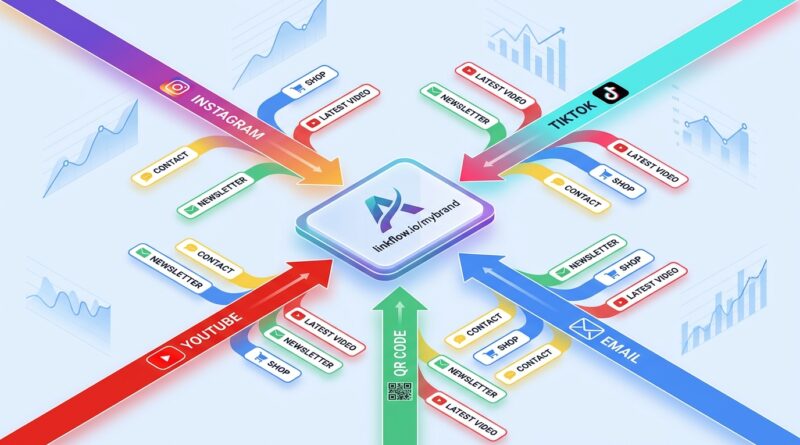
A smart URL is one link you share everywhere, but it does not behave the same way for everyone. It can detect or infer the click source, then send people to the most useful destination or show a version of your bio page designed for that source.
For example
If the visitor comes from Instagram, your page might lead with your shop, best seller, or current promo.
If the visitor comes from YouTube, it might lead with the full guide, newsletter signup, or tools mentioned in the video.
If the visitor comes from a QR code at an event, it might skip the clutter and go straight to booking, directions, or contact info.
Same main link. Smarter experience.
Link in bio smart routing best practices that work
1. Start with the source, not the page design
Before you move buttons around, list your traffic sources. Keep it simple. Instagram bio. TikTok bio. YouTube description. Email signature. Podcast notes. Printed QR code. Event QR code. Packaging QR code.
Then ask one basic question for each source. What is the most likely next step this person wants to take?
That answer should shape the route.
This is the heart of good link in bio smart routing best practices. You are not decorating a landing page. You are matching intent.
2. Give each channel one primary goal
This is where a lot of marketers slip up. They try to make every visitor do five things at once. Shop. Subscribe. Watch. Read. Book. Follow.
That sounds productive. It usually hurts conversions.
Pick one primary action for each channel.
- Instagram: Shop new arrivals
- TikTok: Watch product proof or claim offer
- YouTube: Read the full guide or get the download
- Podcast: Join the mailing list
- Event QR: Book a call
You can still include secondary links. Just do not make them compete with the main job of that click.
3. Change the order of links, not just the destination
Smart routing does not always mean a full redirect. Sometimes the better move is to send people to the same bio page, but reorder the content.
That is useful when you want one branded page but different priorities by source. Your YouTube visitors may see “Get the checklist” first. Your Instagram visitors may see “Shop the collection” first. Your QR visitors may see “Book now” first.
This small change can make the page feel surprisingly relevant.
4. Use channel-specific headlines
People need reassurance that they landed in the right place. A generic “Welcome” does not help much.
Try a simple source-aware heading instead.
- From Instagram? Start here
- Seen us on TikTok? Here are the products from the video
- Watching on YouTube? Get the links and resources here
- At our booth? Book a demo in under 30 seconds
It feels personal without being creepy.
5. Keep the page short
A smart page should reduce choices, not create a bigger list. If you have twelve links, that is not a smart funnel. It is a panic menu.
A good rule is this. One primary action. Two or three secondary links. Anything else should move to your website menu or a separate resource page.
Short pages convert better because people do not have to think as hard.
6. Tag everything for attribution
If you want to improve results, you need to know what worked. Add clean tracking parameters or use routing analytics so you can compare performance by source, campaign, and destination.
That means you should be able to answer questions like:
- Do TikTok clicks buy more than Instagram clicks?
- Do event QR scans lead to calls or just page views?
- Does YouTube traffic prefer a guide over a product page?
If you want to go deeper on that side of the puzzle, Stop Letting Your Short Links Guess Your Audience: How To Use AI-Powered Analytics To Route Every Click Like A Pro is a useful next read.
7. Build routes for old campaigns too
This is one of the most overlooked best practices. Your old QR codes, old post links, and old promo materials may still be getting clicks. If they point to stale pages, you are losing easy wins.
Use one smart URL so you can update destinations without reprinting codes or editing old posts. That gives you flexibility when offers change, inventory changes, or your audience changes.
8. Think mobile first, because that is where most clicks happen
Your adaptive page should load fast, look clean on a phone, and make the first action obvious without scrolling too much.
Big buttons help. Clear wording helps more.
“Shop the summer drop” is better than “Explore.” “Book a 15-minute demo” is better than “Get started.”
A simple setup you can copy
If you want a practical starting point, use this framework.
Your single smart bio URL
One short branded link used in every profile, QR code, and campaign.
Routing logic
- Instagram source: show product-first bio page
- TikTok source: show offer-first or proof-first page
- YouTube source: show resource-first page
- Email source: send directly to the live campaign landing page
- QR source at events: send directly to booking or contact page
Page structure
- One clear headline tied to the source
- One main button above the fold
- Two or three supporting links
- Optional social proof or short explainer
Measurement
- Track click source
- Track destination
- Track conversion outcome
- Review weekly and adjust the top action
Common mistakes to avoid
Sending every source to the homepage
This is easy, but usually lazy. Homepages are built for broad browsing. Most social clicks need a clear next step.
Using the same CTA text everywhere
Different channels produce different expectations. Match the wording to the moment.
Adding too many choices
More options often feel helpful to the brand, not the visitor.
Ignoring QR code traffic
QR scans often come from high-intent moments. Do not dump them onto the same page you use for casual social clicks.
Never reviewing the data
Routing is not a one-time task. You should check what gets clicks and what gets results. Those are not always the same thing.
Who benefits most from this approach
This setup is especially useful for creators, consultants, small businesses, ecommerce brands, podcasters, speakers, and local service companies. If your audience finds you in more than one place, a channel-aware bio link makes a real difference.
It is also useful if your audience is split between content consumption and action. Some people want to read. Some want to shop. Some want to book. Smart routing helps each group get where they need to go faster.
At a Glance: Comparison
| Feature/Aspect | Details | Verdict |
|---|---|---|
| Static link in bio page | Shows the same link order and same message to every visitor, no matter where they came from. | Fine for basics, weak for conversions. |
| Smart source-based routing | Adapts destination, page layout, or top CTA based on channel like Instagram, TikTok, YouTube, email, or QR. | Best choice for higher relevance and better results. |
| Attribution and optimization | Tracks which source, route, and CTA lead to clicks and conversions so you can improve over time. | Important if you want to stop guessing. |
Conclusion
Link in bio tools are exploding in 2026, but too many people still use them like a glorified bookmark list. That leaves money, leads, and attention on the table. A single adaptive link that changes by source is a much smarter setup. It helps you get more from the traffic you already earned, improves attribution across social and QR, and cuts down on the confusing pile of competing calls to action. Start simple. One smart URL. One main goal per channel. One cleaner journey for the person who clicked. That is how you move from “here are all my links” to actually guiding people somewhere useful.