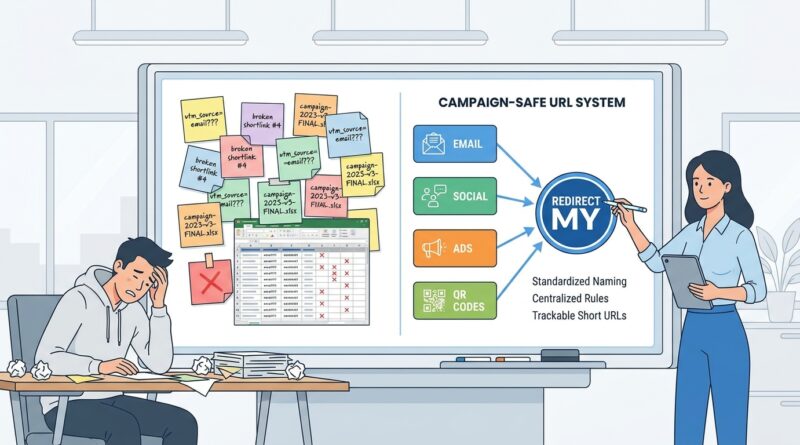
Stop Letting Your Short Links Forget Your Launches: How To Build A ‘Campaign-Safe’ URL System That Survives Team Turnover
You know the scene. A launch goes live, links are flying into emails, social posts, ads, PDFs and QR codes, and everything seems fine. Then six months later someone asks, “Which short link did we use for the spring promo?” Silence. The person who built it is off on holiday, moved teams, or left the company. Now reporting is messy, old links cannot be trusted, and someone rebuilds the same tracking setup from scratch. Again. It is frustrating because the problem usually is not the short-link tool itself. It is the lack of a clear system around naming, ownership, redirects and records. A campaign-safe URL system for link tracking fixes that. It gives your team one shared way to create, store and update links so launches survive staff changes, reporting stays readable, and your future self does not have to play detective every time a campaign comes back from the dead.
⚡ In a Hurry? Key Takeaways
- A campaign-safe URL system for link tracking is really a naming rule, redirect policy, and shared record that your whole team can follow.
- Start with one master spreadsheet or database that logs every short link, destination URL, UTM format, owner, launch date, and status.
- The safest setup uses redirects you control, so links can be updated without breaking old posts, QR codes, or reports.
The real problem is not link creation. It is link memory.
Most teams can make a short link in seconds. That is not hard.
The hard part is knowing, months later, why that link exists, where it points, what campaign it belonged to, which UTM rules were used, and whether changing it will break a dashboard.
That is why launches become fragile. The logic lives in people, not in a system.
When one person becomes the unofficial “link wizard,” everyone else works around them. It feels efficient for a while. Then turnover happens. Or just normal life. People forget. Priorities shift. A naming pattern that made perfect sense in April looks cryptic by November.
What a campaign-safe system actually looks like
You do not need a giant enterprise platform to fix this. You need a few boring rules that everyone follows.
1. Use a short domain your team controls
If possible, use your own branded short domain instead of relying only on a third-party account with generic links.
For example, a team might use something like go.yourbrand.com or links.yourbrand.com. The exact format does not matter as much as ownership does.
If you control the domain, you control the future of the links. That matters when tools change, contracts end, or someone loses admin access.
2. Separate the short link from the destination logic
Your short link should be the stable front door. The destination URL behind it can change if needed.
That one choice saves a lot of pain.
If a social post, brochure, podcast ad, or QR code already points to the short link, you can update the destination later without replacing the printed or published asset.
This is especially useful for evergreen campaigns, event pages, product launches, and anything with offline materials.
3. Create one UTM naming standard and stick to it
UTMs fall apart when every person invents their own style.
One person uses “paid-social.” Another uses “paidsocial.” Another uses “PaidSocial.” Analytics tools often treat those as different values. Now your report is split three ways for no good reason.
Your team needs a written rule for:
- utm_source
- utm_medium
- utm_campaign
- utm_content
- utm_term, if you use it
Keep it simple. Use lowercase. Use hyphens or underscores, not both. Decide when dates belong in campaign names and when they do not.
4. Log every link in one shared place
This is the part teams skip. Then they regret it.
Every short link should have a row in a master record. That record can live in a spreadsheet, Airtable, Notion database, or project tool. The tool matters less than the habit.
At minimum, log:
- Short link
- Full destination URL
- UTM version used
- Campaign name
- Channel
- Owner
- Date created
- Status, such as active, paused, redirected, retired
- Notes on why it exists
That last one is more important than it sounds. A five-word note can save an hour of guessing later.
A simple naming pattern that survives real life
The best naming systems are easy to read and hard to misuse.
For the short links themselves, try a pattern like this:
go.brand.com/product-launch-email
go.brand.com/product-launch-linkedin
go.brand.com/product-launch-qr
That is much better than random strings if your tool allows custom back-halves.
For UTMs, try a structure like this:
- utm_source: linkedin
- utm_medium: social-paid
- utm_campaign: product-launch-2026q2
- utm_content: video-a
This is not the only valid format. The point is consistency.
If your team can guess the format without asking Slack every time, you are on the right track.
Build for the channels that cause the most trouble
Some channels are forgiving. Others are not.
Email links often get rebuilt again and again by different people. Make sure your system defines whether UTMs are added manually, generated automatically by your email platform, or wrapped inside the short link destination.
Pick one method. Mixing methods creates duplicate tracking and messy reports.
Paid ads
Paid media teams often need flexibility for creative tests. That is fine. Just make sure the campaign values still come from an approved list so reports stay clean.
Social posts
Organic social often becomes a free-for-all because many people can publish. Give social teams pre-approved short links or a request form so they are not building tracking from scratch every time.
QR codes
This is where stable redirects really earn their keep.
Once a QR code is printed on packaging, signs, flyers or booth materials, changing it is expensive or impossible. The QR should point to a short URL you control, not directly to a long campaign link with UTMs glued onto the end.
That way the destination can change later while the printed code stays useful.
Who should own the system?
Not one heroic person.
That is the whole point.
A good campaign-safe URL system for link tracking has shared ownership with clear roles:
- One person or team defines the rules
- Several approved people can create links
- Admin access is documented and backed up
- Password and domain access are stored safely
- A handover note explains how the whole thing works
If your link setup would collapse because one person left on a Friday, it is not a system yet. It is a habit.
The minimum setup for a small team
If your team is not huge, do not overcomplicate this.
You can get most of the benefit with:
- One branded short domain
- One approved UTM guide on a single page
- One shared link log
- One template for launch requests
- One monthly check to clean up mistakes
That is enough to stop a lot of repeat work.
A practical workflow you can start this week
Step 1: Write the rules down
Not in someone’s head. Not buried in old chat threads. Put them in a document people can find.
Step 2: Decide your required fields
Do not let people create links without campaign name, source, medium, owner and destination.
Step 3: Create a link request template
This can be a simple form. It reduces random one-off creation and forces people to think about naming before posting.
Step 4: Use redirects for anything public-facing
Especially for QR codes, influencer links, partner links and assets that may live for months.
Step 5: Audit old links
Look for duplicates, dead destinations, messy UTM variations and links that no one owns anymore.
You do not have to clean everything in one day. Start with the launches that still matter to reporting.
Common mistakes that quietly wreck reporting
- Using different spellings for the same source or campaign
- Letting multiple tools auto-add UTMs on top of each other
- Pointing QR codes straight to temporary landing pages
- Creating short links in personal accounts
- Not recording who made a link and why
- Deleting old links instead of marking them retired
That last one is worth repeating. Do not delete old links unless you absolutely must. Mark them clearly. Historical data matters.
Why this matters more during team turnover
When teams change, the weak spots show up fast.
New hires cannot tell which naming rules are real and which were just one person’s preference. Agencies create their own tracking shortcuts. Contractors leave with account knowledge. Suddenly the company has five slightly different versions of the truth.
A campaign-safe URL system for link tracking keeps the institutional memory outside any one person’s inbox. That is the real win.
At a Glance: Comparison
| Feature/Aspect | Details | Verdict |
|---|---|---|
| Random short links | Fast to create, but usually undocumented, inconsistent, and tied to one person’s habits or account. | Fine for one-offs. Risky for real campaigns. |
| Campaign-safe URL system | Uses a shared naming standard, owned redirects, and a central log for every launch link. | Best long-term choice for clean reporting and team continuity. |
| Enterprise link governance platform | Adds approvals, permissions, automation and advanced controls, but often costs more and takes longer to set up. | Useful at scale. Often unnecessary for smaller teams. |
Conclusion
You do not need a flashy tool to stop your launch links from becoming office folklore. You need a system people can actually follow. That means clear naming rules, short URLs you control, one shared record, and enough documentation that a new hire can understand it without a treasure hunt. This helps the community today because teams are increasingly relying on fragmented tools, random spreadsheets and one-off Bitly links that no one fully understands a few months later. A practical guide to designing a campaign-safe URL system means marketers can run launches faster, stop losing historical data during hiring changes, and keep their reporting clean across email, social, ads and QR without needing yet another complex enterprise platform.