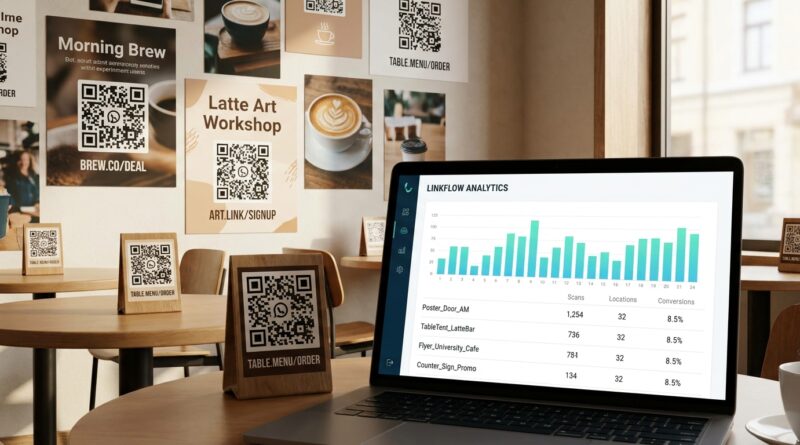
Stop Letting Your QR Links Guess: How To Build ‘Placement-Smart’ Short URLs That Tell You Exactly Which Poster Won
You did the hard part already. You designed the flyer, printed the poster, paid for the placement, and got the QR code out into the real world. Then you open your link report and see the same annoying result every time. One lump of “QR traffic.” That is frustrating, because it tells you offline is doing something, but not what is actually worth repeating. Was it the coffee shop poster? The front window cling? The trade show handout? The version with the discount headline? You cannot improve what you cannot separate.
The fix is simpler than most teams think. You do not need fancy attribution software or a bigger martech budget. You need a clean naming system and a different short URL for each placement. That is how to track QR code campaigns by placement with short URLs. Once each poster, store, or creative gets its own destination link, your reports stop guessing. You can see which location drove scans, which design got ignored, and where to stop wasting print money.
⚡ In a Hurry? Key Takeaways
- To track QR code campaigns by placement, give each poster, store, flyer, or creative its own short URL and QR code.
- Use a simple naming format like city-store-placement-creative so your reports stay readable later.
- Do not reuse one QR code everywhere, or you will blur the data and lose the proof of what actually worked.
The real problem is not QR codes. It is shared links.
Most QR campaigns fail at measurement for one boring reason. Teams send every printed code to the exact same short link.
That makes reporting almost useless. Yes, scans are coming in. No, you cannot tell whether they came from Poster A in Store 12 or Flyer B at the weekend market.
If all roads lead through one link, all your results get mixed together. The QR code is not the issue. The tracking setup is.
This is the same measurement trap that shows up across channels. If you want the broader version of this problem, this guide on Stop Letting Your Short Links Lie About Performance: How To Build ‘Source‑Accurate’ URLs That Prove What Actually Worked explains why one catch-all link keeps hiding the truth.
What “placement-smart” actually means
A placement-smart short URL is just a short link built for a specific physical placement.
Not for the whole campaign. Not for the whole city. Not for every print asset you made.
For one exact thing.
Examples of placements worth separating
You want one short URL for each of these if you care about performance:
- Each store location
- Each poster position, such as front door vs checkout counter
- Each print format, such as flyer vs table tent
- Each creative version, such as discount headline vs product headline
- Each partner venue, such as gym vs cafe vs coworking space
Think of it this way. If you would make a different budget decision based on the result, it deserves its own short URL.
How to track QR code campaigns by placement with short URLs
Here is the practical setup.
Step 1: Start with one destination page
Pick the page people should land on. Maybe it is a product page, event signup page, menu, app download page, or special offer.
That landing page can stay the same across many placements. What changes is the short URL that points to it.
Step 2: Decide what you need to compare
Before you create links, ask one simple question. What decisions am I trying to make later?
Usually the answers are things like:
- Which store gets more scans
- Which poster design gets more engagement
- Which neighborhood placement is worth renewing
- Which print piece deserves a reprint
Your tracking structure should match those decisions.
Step 3: Make one short URL per placement
This is the big one. Each physical placement gets a unique short link.
For example, instead of one generic QR link, make links like:
- brand.co/nyc-soho-window-a
- brand.co/nyc-soho-counter-a
- brand.co/brooklyn-flyer-b
- brand.co/chicago-poster-lobby-a
Each short URL then gets its own QR code.
Same landing page if you want. Different tracking path.
Step 4: Use a naming system that still makes sense three months from now
This matters more than people expect. If your links are named randomly, your reporting will turn into cleanup duty later.
Use a naming formula like this:
[city or region]-[location]-[placement]-[creative]
Example:
- dal-westmall-entrance-offer1
- dal-westmall-foodcourt-offer1
- dal-westmall-entrance-offer2
Now you can compare by placement, by creative, or both.
Step 5: If you use UTM tags, keep them tidy
Your short URL can redirect to a longer destination URL with UTM parameters attached. That gives you cleaner data in analytics tools.
For example, your short link might redirect to:
example.com/sale?utm_source=qr&utm_medium=print&utm_campaign=springpromo&utm_content=westmall_entrance_offer1
The short URL stays simple for printing. The destination URL carries the detail.
If your current setup is messy, make sure your source names stay consistent. “qr,” “QR-code,” and “printqr” should not all mean the same thing.
What to track if you are a small team
You do not need twenty columns of reporting to get useful answers.
Start with these:
- Placement: where the QR code lived
- Location: which store, venue, or area
- Creative: which design or message was shown
- Destination: where people landed
- Scans or clicks: the basic response count
- Conversions: signups, purchases, bookings, or downloads
That is enough to answer the most important question. Not “Did QR work?” but “Which exact offline thing worked best?”
A simple example
Let’s say a local bakery prints posters for three locations.
- Main Street window poster
- Riverside counter card
- Market stall sign
They also test two creative angles:
- “Scan for 10% off”
- “Scan for this week’s specials”
If they use one QR code on all six pieces, they learn almost nothing.
If they create six placement-smart short URLs, they can see that:
- Main Street window got the most scans
- Counter cards barely moved
- The discount message beat the specials message everywhere except the market stall
Now the next print run is obvious. More windows. Fewer counter cards. Different message for the market.
Common mistakes that blur the data
Using one QR code for “brand consistency”
It feels neat. It wrecks your reporting.
Consistency should be in the destination experience and naming rules, not in forcing every placement to share one code.
Changing the poster but keeping the same link
If you test a new headline or offer, give it a new short URL. Otherwise your old and new creative get combined.
Printing before the tracking sheet is final
Always keep a simple spreadsheet with columns for short URL, placement, location, creative, print date, and owner. It saves you from “Wait, which one was this?” later.
Making names too clever
Funny internal nicknames are fun for about a week. Clear names win every time.
Do you need special software?
Usually, no.
If you already control your short links, that is enough to get started. Most teams can do this with:
- A short URL tool
- A spreadsheet
- Your normal analytics platform
The value does not come from buying more tools. It comes from being more specific with the links you already own.
How granular should you go?
Not every campaign needs obsessive detail.
Here is a good rule.
- If placements are expensive, track them separately.
- If locations perform differently, track them separately.
- If creatives might change results, track them separately.
But do not split things so far that nobody maintains the system.
A local business might track by store and sign type. A larger retail chain might track by store, fixture position, and creative version.
A quick setup you can copy
Your spreadsheet columns
- Campaign
- City
- Store or venue
- Placement
- Creative version
- Short URL
- QR file name
- Destination URL
- UTM content value
- Print date
Your naming pattern
campaign-city-location-placement-creative
Your example
spring23-austin-southpark-window-v1
That one line tells you almost everything without opening another document.
What success looks like
After a few weeks, your report should let you answer practical questions fast:
- Which poster placement drove the most scans?
- Which store got the best scan-to-sale rate?
- Which creative version earned the reprint?
- Which venue should lose its budget next month?
That is the whole point. Clearer decisions. Less guessing.
At a Glance: Comparison
| Feature/Aspect | Details | Verdict |
|---|---|---|
| One shared QR link | Easy to print, but all scans from all posters, stores, and creatives get mixed into one report. | Bad for decision-making |
| One short URL per placement | Each poster, flyer, or in-store sign gets its own trackable path, even if the landing page stays the same. | Best balance of effort and clarity |
| Placement + creative naming system | Readable labels like location-placement-version make reports easier to sort and compare later. | Strongly recommended |
Conclusion
QR and print are sending more traffic than many teams expected, but too many reports still throw every scan into one bucket. That hides the winners and keeps weak placements alive longer than they deserve. A placement-first setup fixes that. Give each poster, store, or creative its own short URL, keep the naming clean, and let the data stay separated from day one. You do not need a bigger stack to get smarter. You just need links that stop guessing. Once you have that, even a small team can get the kind of clarity that helps you scale what is working and quietly cut what is not.