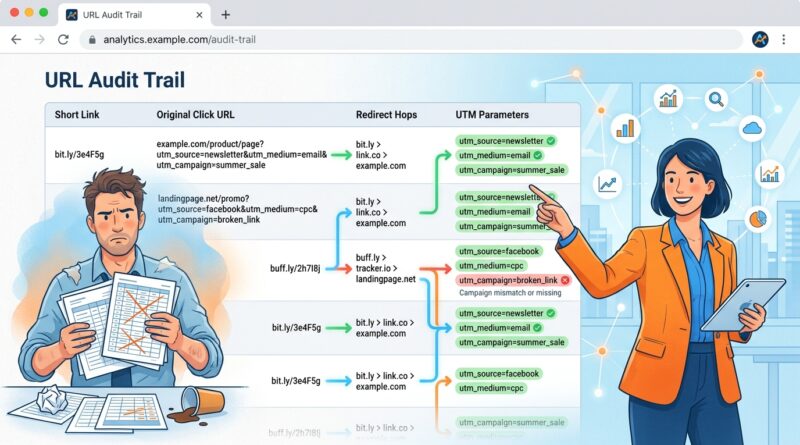
Stop Letting Your Short Links Lose The Trail: How To Build ‘Audit‑Ready’ URLs That Never Drop UTM Data Again
You are not imagining it. You build a campaign URL, add clean UTM tags, shorten it, launch the ad, and then analytics tells you the traffic came from direct / none or not set. That is maddening, especially when real budget is on the line. Most of the time, the problem is not your spreadsheet or your naming rules. It is what happens after the click. Redirects can strip parameters. Social apps can open links in odd in-app browsers. Cookie banners can interrupt attribution. Mobile handoffs can make a good URL look broken by the time the page finally loads. If you have been stuck wondering why UTM tracking not working through URL shorteners keeps ruining your reports, the fix is to stop treating the short link like a black box. An audit-ready URL setup logs the full redirect chain, checks whether UTMs survive to the landing page, and flags issues before your next campaign burns more money.
⚡ In a Hurry? Key Takeaways
- UTM tracking often fails through shorteners because the redirect path, app browser, or landing page setup drops parameters before analytics can read them.
- Log the original click URL, every redirect hop, and the final landing URL so you can spot exactly where UTMs disappear.
- A small audit routine before launch can save wasted ad spend and make your reports much easier to trust.
Why this keeps happening
Most marketers assume the short link simply passes the visitor along. Nice and clean. But real-world clicks are messy.
A person taps your link in Instagram, Facebook, LinkedIn, email, SMS, or a mobile ad. That click may go through a shortener, then a tracking redirect, then a geo or device rule, then a cookie consent screen, and only then reach your landing page. Every extra step is another chance for UTM data to get lost.
That is why your original campaign URL can look perfect while your analytics report looks useless.
The usual troublemakers
Here are the most common reasons UTM data vanishes:
- Redirect rules that do not preserve query parameters
- Landing pages that rewrite the URL on load
- Cookie banners or consent tools firing before analytics is ready
- In-app browsers inside social platforms behaving differently from normal browsers
- Server-side redirects from HTTP to HTTPS or from one domain to another
- Auto-tagging conflicts or bad handoffs between ad platforms and analytics tools
None of these are dramatic on their own. Together, they create attribution chaos.
What an “audit-ready” URL actually means
An audit-ready URL is not just a shortened link with UTMs attached. It is a link setup you can verify from click to conversion.
In simple terms, you want to answer three questions:
- What exact URL did the person click first?
- What redirects happened in between?
- What exact URL loaded at the end?
If you can compare the original click URL to the final landing URL, you can stop guessing. You can see whether utm_source, utm_medium, utm_campaign, and any other parameters survived the trip.
The basic audit trail to capture
For each campaign link, keep a record of:
- Original long URL with full UTM string
- Published short URL
- Timestamp of test clicks
- Device and browser used for testing
- Each redirect hop in order
- Final landing URL as loaded in the browser
- Whether analytics captured the same source and campaign values
That sounds technical, but it is really just a receipt for your click path.
How to test your short links before launch
You do not need a giant QA team. You need a repeatable checklist.
1. Start with the full destination URL
Before shortening anything, paste your destination URL into a plain text doc and confirm every UTM parameter is spelled correctly. Watch for small mistakes like utm-source instead of utm_source, mixed capitalization, or spaces hidden in campaign names.
2. Create the short link and test the redirect chain
Click the short link yourself. Then inspect what happens. Does it go straight to the final page, or are there extra hops? If you use Redirect My… or a similar platform, look for click path details that show the chain clearly.
Your goal is simple. The final URL should still contain the UTM parameters, or the landing page should reliably pass that attribution into analytics even if the visible URL changes.
3. Test on mobile, not just desktop
This is where many teams get blindsided. A link that works perfectly in Chrome on a laptop can break inside a social app browser on an iPhone or Android device.
Test from:
- iPhone Safari
- Android Chrome
- Instagram in-app browser
- Facebook in-app browser
- Email app tap-through
Mobile is often where silent UTM loss shows up first.
4. Compare the click URL to the landing URL
This is the key habit. Do not just ask, “Did the page load?” Ask, “Did the same tracking data arrive?”
If the original URL has five tracking parameters and the landing page only shows two, that is a red flag. If the final page strips everything, you need to know whether your analytics still catches the source another way. If not, attribution is broken.
5. Check the analytics result after the click
Run a test visit and then check real-time or debug views in your analytics tool. If the click shows up as direct, not set, or unassigned, your URL path needs work.
This is the moment many people blame GA4. Sometimes GA4 deserves side-eye. But often the link chain is where the damage starts.
Where short links and smart routing can go wrong
Smart redirects are useful. They can send people to different pages based on device, location, or time. But every rule increases complexity.
That does not mean you should avoid them. It means you should audit them.
If you are already using dynamic destination logic, it is worth reading Stop Letting Your Short Links Miss The Buyer’s Moment: How To Build ‘Intent-Aware’ URLs That React In Real Time. The same flexibility that improves conversion can also create hidden tracking gaps if you do not check each route carefully.
Common smart-link mistakes
- One device route preserves UTMs, another route does not
- A regional page uses a different consent tool that delays analytics
- One destination adds a trailing slash or page rewrite that strips parameters
- A fallback page goes live without the same tracking setup as the main page
This is why one audience segment looks fine in reports while another disappears into direct traffic.
How to make your URLs “audit-ready” in practice
Here is the simple version. Treat every short link like a tiny funnel you can inspect.
Build a standard logging routine
For each campaign, log:
- Campaign name
- Intended source, medium, and campaign values
- Short link used publicly
- Expected final destination
- Actual final destination after test click
- Status of UTM preservation
- Notes on mobile or app-specific behavior
This can live in a spreadsheet if needed. Fancy is optional. Consistency is not.
Set alerts for missing UTMs
If your link platform supports monitoring, use it. If not, create a manual spot-check routine before every launch and during the first day of traffic.
You want an alert when:
- The final URL is missing expected UTM parameters
- A redirect path changes unexpectedly
- A destination page returns an error or loads a fallback page
- Analytics starts recording an unusual spike in direct / none for a tagged campaign
The sooner you catch the problem, the less money you waste.
Keep consent tools from breaking attribution
Cookie banners are important. They can also be sneaky attribution breakers if they fire in the wrong order or block analytics before campaign data is stored properly.
Talk to whoever manages your consent setup and ask one plain question: “When a visitor lands with UTMs, do we preserve that campaign data before consent steps change the page state?”
If nobody knows, test it.
What to do when reports still say direct / none
If your campaign traffic still lands in direct / none, do not immediately retag every ad. Work backwards.
A quick troubleshooting order
- Check the original campaign URL for correct UTM formatting.
- Test the short link and map every redirect hop.
- Compare the final landing URL to the original click URL.
- Test on mobile and in social app browsers.
- Review consent tools, page scripts, and URL rewrites.
- Confirm analytics is reading the campaign data on first page load.
This order matters. It keeps you from changing five things at once and never learning what was actually wrong.
At a Glance: Comparison
| Feature/Aspect | Details | Verdict |
|---|---|---|
| Basic short link setup | Shortens a long URL but may not show whether UTMs survive every redirect and browser condition. | Fine for simple use, risky for paid campaigns. |
| Audit-ready URL workflow | Logs original URL, redirect chain, final landing URL, and checks whether analytics sees the same attribution. | Best choice when accuracy matters. |
| Mobile and in-app testing | Catches platform quirks, consent issues, and dropped parameters that desktop-only testing misses. | Essential before launch. |
Conclusion
If you have been fighting with UTM tracking not working through URL shorteners, the answer is usually not more guessing. It is better visibility. Right now marketers are wasting real budget because redirects, cookie banners and platform quirks are silently throwing away UTM data, especially on mobile and in social apps. A practical, link-first way to log the full redirect chain, compare the original click URL to the final landing URL, and alert you when UTMs are missing helps the community stop guessing, fix broken tracking before the next launch, and finally trust the numbers they see inside their Redirect My… account and analytics tools. Once you can see the whole path, these “mystery” attribution problems get a lot less mysterious.